Realistic Snowfall

![Cayo Perico Hideout [MapEditor]](https://img.gta5-mods.com/q75-w500-h333-cfill/images/cayo-perico-hideout/972eea-1_GF.jpg "Cayo Perico Hideout [MapEditor]")


57
5
57
5
GTA V Realistic Snowfalls Mod v1
Description :
Twelve years after the release of my first mod, ‘Realistic Snowfall v1’ for GTA IV, I'm back with a similar mod, but for GTA V!
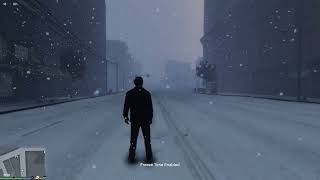
This mod makes snowfall in GTA V more realistic and abundant, creating an immersive winter atmosphere.
I don't know if this mod is compatible with GTAV Legacy... you'll have to test it!
Change log v1 : initial version for GTA V (will be updated soon)
- Snow is no longer transparent and falls faster, just like in real life.
- Snowflake resolution has been reduced to increase their density when it snows.
- All types of snowy weather, snowfall intensity and ‘snow boxes’ have been reworked and improved:
+ ‘XMAS’ weather = snow with bright, dense flakes, cloudy sky with some sunny spells, a little mist
+ ‘SNOWLIGHT’ weather = light snow with small, tight flakes, bright but overcast sky
+ ‘SNOW’ weather = moderate to heavy snow, with little or no wind, fog and darker sky
+ ‘BLIZZARD’ weather = heavy and intense snowfall with large flakes, wind, freezing fog and dark sky
INSTALLATION : (make a backup if needed)
1 / Download and install every modding REQUIREMENTS (ScripthookV, OpenIV etc)
2-a / INSTALLATION if your "weather.xml" is not already modified by another of your mods
A / Using OpenIV, go to GTAV\mods\common.rpf\data\levels\gta5\weather then drag and drop every files from my archive in the "weather" folder (blizzard_render_drop.xml etc)
B / Go to GTAV\mods\update\update.rpf\common\data\timecycle then drag and drop every files from my archive in the "timecycle" folder (w_xmas.xml etc)
C / Go to GTAV\mods\x64a.rpf\textures then drag and drop "fxweather.ytd" file from my archive here
D / Edit "visualsettings.dat" in GTAV\mods\update\update.rpf\common\data, and find the line "rain.NumberParticles" and replace the number shown (example 16384) by 30000.
E / Go to GTAV\mods\update\update.rpf\common\data\levels\gta5 then drag and drop "weather.xml" file from my archive here
2-b / INSTALLATION WITH ANOTHER GRAPHIC MOD (ChromatiX, NVE, VisualV, QuantV etc...)
A / Using OpenIV, follow all the steps in 2-a above EXCEPT step E /
B / When you're done, go to GTAV\mods\update\update.rpf\common\data\levels\gta5 and edit your "weather.xml" game file with OpenIV or a notepad.
C / Search "VFX_SNOW_LIGHT_DROP" and put "" just below instead of the default value of the file here
D / Search "VFX_SNOW_HEAVY_DROP" and put "" just below instead of the default value of the file here
E / Search "BLIZZARD_DROP" and put "" just below instead of the default value of the file here
F / Search "SNOW" and replace the 3 lines below you have in your file, by these ones :
G / Search "BLIZZARD" and replace the 3 lines below you have in your file, by these ones :
H / Search "SNOWLIGHT" and replace the 3 lines below you have in your file, by these ones :
I / Search "XMAS" and replace the 3 lines below you have in your file, by these ones :
And now, you are done !
Bugs found :
- sometimes, the intensity of the snowfall may vary at the beginning of the snowfall - fix in progress
- at some times of the day / night, snowflakes may appear too bright, work also in progress
- fog tends to dissipate as altitude increases
- if you encounter any other bugs related to the in-game mod, please feel free to mention them in the comments for correction
A lot of work has gone into this mod, and although some bugs may still be present, new extensions and fixes are already in the pipeline. Please respect the work we've done.
This is a personal project created out of passion. You use it at your own risk. I cannot be held responsible for any bugs, save corruptions or other problems that may occur in your game. Always remember to make backups before installing a mod.
If you use this mod, and make videos / images with my mods, please provide a link to my Facebook / Youtube pages and also on Grand Theft Space mod. Thank you very much!
©Flash76
Description :
Twelve years after the release of my first mod, ‘Realistic Snowfall v1’ for GTA IV, I'm back with a similar mod, but for GTA V!
This mod makes snowfall in GTA V more realistic and abundant, creating an immersive winter atmosphere.
I don't know if this mod is compatible with GTAV Legacy... you'll have to test it!
Change log v1 : initial version for GTA V (will be updated soon)
- Snow is no longer transparent and falls faster, just like in real life.
- Snowflake resolution has been reduced to increase their density when it snows.
- All types of snowy weather, snowfall intensity and ‘snow boxes’ have been reworked and improved:
+ ‘XMAS’ weather = snow with bright, dense flakes, cloudy sky with some sunny spells, a little mist
+ ‘SNOWLIGHT’ weather = light snow with small, tight flakes, bright but overcast sky
+ ‘SNOW’ weather = moderate to heavy snow, with little or no wind, fog and darker sky
+ ‘BLIZZARD’ weather = heavy and intense snowfall with large flakes, wind, freezing fog and dark sky
INSTALLATION : (make a backup if needed)
1 / Download and install every modding REQUIREMENTS (ScripthookV, OpenIV etc)
2-a / INSTALLATION if your "weather.xml" is not already modified by another of your mods
A / Using OpenIV, go to GTAV\mods\common.rpf\data\levels\gta5\weather then drag and drop every files from my archive in the "weather" folder (blizzard_render_drop.xml etc)
B / Go to GTAV\mods\update\update.rpf\common\data\timecycle then drag and drop every files from my archive in the "timecycle" folder (w_xmas.xml etc)
C / Go to GTAV\mods\x64a.rpf\textures then drag and drop "fxweather.ytd" file from my archive here
D / Edit "visualsettings.dat" in GTAV\mods\update\update.rpf\common\data, and find the line "rain.NumberParticles" and replace the number shown (example 16384) by 30000.
E / Go to GTAV\mods\update\update.rpf\common\data\levels\gta5 then drag and drop "weather.xml" file from my archive here
2-b / INSTALLATION WITH ANOTHER GRAPHIC MOD (ChromatiX, NVE, VisualV, QuantV etc...)
A / Using OpenIV, follow all the steps in 2-a above EXCEPT step E /
B / When you're done, go to GTAV\mods\update\update.rpf\common\data\levels\gta5 and edit your "weather.xml" game file with OpenIV or a notepad.
C / Search "VFX_SNOW_LIGHT_DROP" and put "" just below instead of the default value of the file here
D / Search "VFX_SNOW_HEAVY_DROP" and put "" just below instead of the default value of the file here
E / Search "BLIZZARD_DROP" and put "" just below instead of the default value of the file here
F / Search "SNOW" and replace the 3 lines below you have in your file, by these ones :
G / Search "BLIZZARD" and replace the 3 lines below you have in your file, by these ones :
H / Search "SNOWLIGHT" and replace the 3 lines below you have in your file, by these ones :
I / Search "XMAS" and replace the 3 lines below you have in your file, by these ones :
And now, you are done !
Bugs found :
- sometimes, the intensity of the snowfall may vary at the beginning of the snowfall - fix in progress
- at some times of the day / night, snowflakes may appear too bright, work also in progress
- fog tends to dissipate as altitude increases
- if you encounter any other bugs related to the in-game mod, please feel free to mention them in the comments for correction
A lot of work has gone into this mod, and although some bugs may still be present, new extensions and fixes are already in the pipeline. Please respect the work we've done.
This is a personal project created out of passion. You use it at your own risk. I cannot be held responsible for any bugs, save corruptions or other problems that may occur in your game. Always remember to make backups before installing a mod.
If you use this mod, and make videos / images with my mods, please provide a link to my Facebook / Youtube pages and also on Grand Theft Space mod. Thank you very much!
©Flash76
Poprvé nahráno: 7 hours ago
Poslední aktulizace: 7 hours ago
Last Downloaded: 1 minute ago
1 Komentář
More mods by flash76:
GTA V Realistic Snowfalls Mod v1
Description :
Twelve years after the release of my first mod, ‘Realistic Snowfall v1’ for GTA IV, I'm back with a similar mod, but for GTA V!
This mod makes snowfall in GTA V more realistic and abundant, creating an immersive winter atmosphere.
I don't know if this mod is compatible with GTAV Legacy... you'll have to test it!
Change log v1 : initial version for GTA V (will be updated soon)
- Snow is no longer transparent and falls faster, just like in real life.
- Snowflake resolution has been reduced to increase their density when it snows.
- All types of snowy weather, snowfall intensity and ‘snow boxes’ have been reworked and improved:
+ ‘XMAS’ weather = snow with bright, dense flakes, cloudy sky with some sunny spells, a little mist
+ ‘SNOWLIGHT’ weather = light snow with small, tight flakes, bright but overcast sky
+ ‘SNOW’ weather = moderate to heavy snow, with little or no wind, fog and darker sky
+ ‘BLIZZARD’ weather = heavy and intense snowfall with large flakes, wind, freezing fog and dark sky
INSTALLATION : (make a backup if needed)
1 / Download and install every modding REQUIREMENTS (ScripthookV, OpenIV etc)
2-a / INSTALLATION if your "weather.xml" is not already modified by another of your mods
A / Using OpenIV, go to GTAV\mods\common.rpf\data\levels\gta5\weather then drag and drop every files from my archive in the "weather" folder (blizzard_render_drop.xml etc)
B / Go to GTAV\mods\update\update.rpf\common\data\timecycle then drag and drop every files from my archive in the "timecycle" folder (w_xmas.xml etc)
C / Go to GTAV\mods\x64a.rpf\textures then drag and drop "fxweather.ytd" file from my archive here
D / Edit "visualsettings.dat" in GTAV\mods\update\update.rpf\common\data, and find the line "rain.NumberParticles" and replace the number shown (example 16384) by 30000.
E / Go to GTAV\mods\update\update.rpf\common\data\levels\gta5 then drag and drop "weather.xml" file from my archive here
2-b / INSTALLATION WITH ANOTHER GRAPHIC MOD (ChromatiX, NVE, VisualV, QuantV etc...)
A / Using OpenIV, follow all the steps in 2-a above EXCEPT step E /
B / When you're done, go to GTAV\mods\update\update.rpf\common\data\levels\gta5 and edit your "weather.xml" game file with OpenIV or a notepad.
C / Search "VFX_SNOW_LIGHT_DROP" and put "" just below instead of the default value of the file here
D / Search "VFX_SNOW_HEAVY_DROP" and put "" just below instead of the default value of the file here
E / Search "BLIZZARD_DROP" and put "" just below instead of the default value of the file here
F / Search "SNOW" and replace the 3 lines below you have in your file, by these ones :
G / Search "BLIZZARD" and replace the 3 lines below you have in your file, by these ones :
H / Search "SNOWLIGHT" and replace the 3 lines below you have in your file, by these ones :
I / Search "XMAS" and replace the 3 lines below you have in your file, by these ones :
And now, you are done !
Bugs found :
- sometimes, the intensity of the snowfall may vary at the beginning of the snowfall - fix in progress
- at some times of the day / night, snowflakes may appear too bright, work also in progress
- fog tends to dissipate as altitude increases
- if you encounter any other bugs related to the in-game mod, please feel free to mention them in the comments for correction
A lot of work has gone into this mod, and although some bugs may still be present, new extensions and fixes are already in the pipeline. Please respect the work we've done.
This is a personal project created out of passion. You use it at your own risk. I cannot be held responsible for any bugs, save corruptions or other problems that may occur in your game. Always remember to make backups before installing a mod.
If you use this mod, and make videos / images with my mods, please provide a link to my Facebook / Youtube pages and also on Grand Theft Space mod. Thank you very much!
©Flash76
Description :
Twelve years after the release of my first mod, ‘Realistic Snowfall v1’ for GTA IV, I'm back with a similar mod, but for GTA V!
This mod makes snowfall in GTA V more realistic and abundant, creating an immersive winter atmosphere.
I don't know if this mod is compatible with GTAV Legacy... you'll have to test it!
Change log v1 : initial version for GTA V (will be updated soon)
- Snow is no longer transparent and falls faster, just like in real life.
- Snowflake resolution has been reduced to increase their density when it snows.
- All types of snowy weather, snowfall intensity and ‘snow boxes’ have been reworked and improved:
+ ‘XMAS’ weather = snow with bright, dense flakes, cloudy sky with some sunny spells, a little mist
+ ‘SNOWLIGHT’ weather = light snow with small, tight flakes, bright but overcast sky
+ ‘SNOW’ weather = moderate to heavy snow, with little or no wind, fog and darker sky
+ ‘BLIZZARD’ weather = heavy and intense snowfall with large flakes, wind, freezing fog and dark sky
INSTALLATION : (make a backup if needed)
1 / Download and install every modding REQUIREMENTS (ScripthookV, OpenIV etc)
2-a / INSTALLATION if your "weather.xml" is not already modified by another of your mods
A / Using OpenIV, go to GTAV\mods\common.rpf\data\levels\gta5\weather then drag and drop every files from my archive in the "weather" folder (blizzard_render_drop.xml etc)
B / Go to GTAV\mods\update\update.rpf\common\data\timecycle then drag and drop every files from my archive in the "timecycle" folder (w_xmas.xml etc)
C / Go to GTAV\mods\x64a.rpf\textures then drag and drop "fxweather.ytd" file from my archive here
D / Edit "visualsettings.dat" in GTAV\mods\update\update.rpf\common\data, and find the line "rain.NumberParticles" and replace the number shown (example 16384) by 30000.
E / Go to GTAV\mods\update\update.rpf\common\data\levels\gta5 then drag and drop "weather.xml" file from my archive here
2-b / INSTALLATION WITH ANOTHER GRAPHIC MOD (ChromatiX, NVE, VisualV, QuantV etc...)
A / Using OpenIV, follow all the steps in 2-a above EXCEPT step E /
B / When you're done, go to GTAV\mods\update\update.rpf\common\data\levels\gta5 and edit your "weather.xml" game file with OpenIV or a notepad.
C / Search "VFX_SNOW_LIGHT_DROP" and put "" just below instead of the default value of the file here
D / Search "VFX_SNOW_HEAVY_DROP" and put "" just below instead of the default value of the file here
E / Search "BLIZZARD_DROP" and put "" just below instead of the default value of the file here
F / Search "SNOW" and replace the 3 lines below you have in your file, by these ones :
G / Search "BLIZZARD" and replace the 3 lines below you have in your file, by these ones :
H / Search "SNOWLIGHT" and replace the 3 lines below you have in your file, by these ones :
I / Search "XMAS" and replace the 3 lines below you have in your file, by these ones :
And now, you are done !
Bugs found :
- sometimes, the intensity of the snowfall may vary at the beginning of the snowfall - fix in progress
- at some times of the day / night, snowflakes may appear too bright, work also in progress
- fog tends to dissipate as altitude increases
- if you encounter any other bugs related to the in-game mod, please feel free to mention them in the comments for correction
A lot of work has gone into this mod, and although some bugs may still be present, new extensions and fixes are already in the pipeline. Please respect the work we've done.
This is a personal project created out of passion. You use it at your own risk. I cannot be held responsible for any bugs, save corruptions or other problems that may occur in your game. Always remember to make backups before installing a mod.
If you use this mod, and make videos / images with my mods, please provide a link to my Facebook / Youtube pages and also on Grand Theft Space mod. Thank you very much!
©Flash76
Poprvé nahráno: 7 hours ago
Poslední aktulizace: 7 hours ago
Last Downloaded: 1 minute ago
 5mods on Discord

This file has been approved automatically. If you think this file should not be here for any reason please report it.