Realistic Sniper v1.7


80
8
80
8
Realistic Sniper
Author: ReisModBr
Mode: Story Mode (Offline)
Leave your comment, what you thought, or suggestions, improvements, what you think should be improved in the next update.
Leave a like if you enjoyed my work, give it a star, this helps encourage me to develop and bring more mods.
Description
Realistic Sniper
Realistic Sniper is an immersion focused mod for snipers. It adds a more realistic experience to the use of sniper rifles,
with features such as breathing-breath control, a sequence of effects geared towards cinematic gameplay,
and a sense of weight precision when aiming.
Note: This package includes the .DLL mod and three additional folders inside the scripts folder. Simply copy and paste the scripts folder into your game's root directory. These folders contain the necessary files for installation and to make the mod work.
Requirements
GTA V Story Mod
ScriptHookV
ScriptHookVDotNet v3.7.0 nightly.75
Warning Nightly builds may change compatibility.
If you update ScriptHookVDotNet3 and the mod stops loading, revert to the recommended version.
Installation
Download and install ScriptHookV and ScriptHookVDotNet3-nightly recommended version above.
If you don't have a scripts folder, create one. If you already have one, just copy the folder (scripts) with all the files inside it to the root folder of your GTA V game.
Attention- Do not rename the files or the files inside the folders, as the mod needs to recognize each folder and each file with its respective name.
Scripts folder to Grand Theft Auto V - scripts
How it works
The mod runs automatically when you start the game.
Troubleshooting
1 The mod does not appear does not work
Confirm that ScriptHookV.dll and ScriptHookVDotNet3.dll are in the root folder of GTA V.
Confirm that Sniper-ReisBr.dll is in Grand Theft Auto V scripts.
2) Error in the log similar to
Could not load file or assembly ScriptHookVDotNet3, Version...'
This indicates a version incompatibility between your DLL and the installed ScriptHookVDotNet3.
Solution
Revert to the recommended version of ScriptHookVDotNet3 v3.7.0 nightly 75.
Bomb Voice Headshot sound not working
Solution
Verify that you copied the scripts folder containing the three folders
BombVoice
Sniper Sound
Sound Effect Headshot
Each folder contains the necessary files for the mod to work.
DO NOT rename the folder names or the files inside the folders.
Complete .ini file to configure keys and enable/disable effects
All this while maintaining stable performance, without FPS drops and without crashes.
MAIN FEATURES
Sniper Scope Shake
Slight tremor while aiming with a sniper rifle, generating a realistic sensation.
Hold Breath
Default key ShiftKey
Resets tremor
heartbeat
Displays breath bar
Last 3 seconds turn red
Sounds
heartbeat
critical zone
HEADSHOT FX 7 exclusive sounds
When the player hits any NPC civilian, police officer, SWAT, gang, etc. in the head with a firearm, a sound sequence plays
Headshot1.wav Headshot2.wav ... Headshot7.wav - restarts
The same sounds do not repeat.
Can be enabled-disabled in the .ini file.
NEW-Bomb Voice Look at the bomb
Whenever the player throws a real grenade Grenade, Sticky Bomb, Proximity Mine, Pipe Bomb, etc., the mod plays the radio sound:
look at-the radio bomb.wav
Does not play on
Molotov cocktails
Firearms, Melee weapons
Other non explosive weapons
SETTINGS .ini
Automatically generated file in:
scripts Sniper ReisBr.ini
Audio section:
HeartbeatEnabled=true
HeadshotEnabled=true
BombVoiceEnabled=true
BombVoiceEnabled=true enables disables bomb audio
You can disable any feature without deleting anything.
INSTALLATION
Simply copy the scripts folder it comes complete with all the necessary files and paste it into the GTA V root folder.
The scripts folder should contain
scripts
Sniper ReisBr.dll
Sniper ReisBr.ini created when the game starts
Sniper-Sound
Sound Effect Headshot
BombVoice
CREDITS AND THANKS
ReisBr Author, programming, effects, design and optimization
GTA V Community
Permissions
Reuploading this mod repost-rehost to any website is prohibited.
Redistributing this file in paid packages-modpacks without permission is prohibited. Respect the author's work. You can record videos and live streams using the mod, with credit to the author and the GTA V website.
Have fun!
Author: ReisModBr
Mode: Story Mode (Offline)
Leave your comment, what you thought, or suggestions, improvements, what you think should be improved in the next update.
Leave a like if you enjoyed my work, give it a star, this helps encourage me to develop and bring more mods.
Description
Realistic Sniper
Realistic Sniper is an immersion focused mod for snipers. It adds a more realistic experience to the use of sniper rifles,
with features such as breathing-breath control, a sequence of effects geared towards cinematic gameplay,
and a sense of weight precision when aiming.
Note: This package includes the .DLL mod and three additional folders inside the scripts folder. Simply copy and paste the scripts folder into your game's root directory. These folders contain the necessary files for installation and to make the mod work.
Requirements
GTA V Story Mod
ScriptHookV
ScriptHookVDotNet v3.7.0 nightly.75
Warning Nightly builds may change compatibility.
If you update ScriptHookVDotNet3 and the mod stops loading, revert to the recommended version.
Installation
Download and install ScriptHookV and ScriptHookVDotNet3-nightly recommended version above.
If you don't have a scripts folder, create one. If you already have one, just copy the folder (scripts) with all the files inside it to the root folder of your GTA V game.
Attention- Do not rename the files or the files inside the folders, as the mod needs to recognize each folder and each file with its respective name.
Scripts folder to Grand Theft Auto V - scripts
How it works
The mod runs automatically when you start the game.
Troubleshooting
1 The mod does not appear does not work
Confirm that ScriptHookV.dll and ScriptHookVDotNet3.dll are in the root folder of GTA V.
Confirm that Sniper-ReisBr.dll is in Grand Theft Auto V scripts.
2) Error in the log similar to
Could not load file or assembly ScriptHookVDotNet3, Version...'
This indicates a version incompatibility between your DLL and the installed ScriptHookVDotNet3.
Solution
Revert to the recommended version of ScriptHookVDotNet3 v3.7.0 nightly 75.
Bomb Voice Headshot sound not working
Solution
Verify that you copied the scripts folder containing the three folders
BombVoice
Sniper Sound
Sound Effect Headshot
Each folder contains the necessary files for the mod to work.
DO NOT rename the folder names or the files inside the folders.
Complete .ini file to configure keys and enable/disable effects
All this while maintaining stable performance, without FPS drops and without crashes.
MAIN FEATURES
Sniper Scope Shake
Slight tremor while aiming with a sniper rifle, generating a realistic sensation.
Hold Breath
Default key ShiftKey
Resets tremor
heartbeat
Displays breath bar
Last 3 seconds turn red
Sounds
heartbeat
critical zone
HEADSHOT FX 7 exclusive sounds
When the player hits any NPC civilian, police officer, SWAT, gang, etc. in the head with a firearm, a sound sequence plays
Headshot1.wav Headshot2.wav ... Headshot7.wav - restarts
The same sounds do not repeat.
Can be enabled-disabled in the .ini file.
NEW-Bomb Voice Look at the bomb
Whenever the player throws a real grenade Grenade, Sticky Bomb, Proximity Mine, Pipe Bomb, etc., the mod plays the radio sound:
look at-the radio bomb.wav
Does not play on
Molotov cocktails
Firearms, Melee weapons
Other non explosive weapons
SETTINGS .ini
Automatically generated file in:
scripts Sniper ReisBr.ini
Audio section:
HeartbeatEnabled=true
HeadshotEnabled=true
BombVoiceEnabled=true
BombVoiceEnabled=true enables disables bomb audio
You can disable any feature without deleting anything.
INSTALLATION
Simply copy the scripts folder it comes complete with all the necessary files and paste it into the GTA V root folder.
The scripts folder should contain
scripts
Sniper ReisBr.dll
Sniper ReisBr.ini created when the game starts
Sniper-Sound
Sound Effect Headshot
BombVoice
CREDITS AND THANKS
ReisBr Author, programming, effects, design and optimization
GTA V Community
Permissions
Reuploading this mod repost-rehost to any website is prohibited.
Redistributing this file in paid packages-modpacks without permission is prohibited. Respect the author's work. You can record videos and live streams using the mod, with credit to the author and the GTA V website.
Have fun!
Poprvé nahráno: před jedním dnem
Poslední aktulizace: před jedním dnem
Last Downloaded: před 24 minutami
4 Komentáře
More mods by ReisBr:
Realistic Sniper
Author: ReisModBr
Mode: Story Mode (Offline)
Leave your comment, what you thought, or suggestions, improvements, what you think should be improved in the next update.
Leave a like if you enjoyed my work, give it a star, this helps encourage me to develop and bring more mods.
Description
Realistic Sniper
Realistic Sniper is an immersion focused mod for snipers. It adds a more realistic experience to the use of sniper rifles,
with features such as breathing-breath control, a sequence of effects geared towards cinematic gameplay,
and a sense of weight precision when aiming.
Note: This package includes the .DLL mod and three additional folders inside the scripts folder. Simply copy and paste the scripts folder into your game's root directory. These folders contain the necessary files for installation and to make the mod work.
Requirements
GTA V Story Mod
ScriptHookV
ScriptHookVDotNet v3.7.0 nightly.75
Warning Nightly builds may change compatibility.
If you update ScriptHookVDotNet3 and the mod stops loading, revert to the recommended version.
Installation
Download and install ScriptHookV and ScriptHookVDotNet3-nightly recommended version above.
If you don't have a scripts folder, create one. If you already have one, just copy the folder (scripts) with all the files inside it to the root folder of your GTA V game.
Attention- Do not rename the files or the files inside the folders, as the mod needs to recognize each folder and each file with its respective name.
Scripts folder to Grand Theft Auto V - scripts
How it works
The mod runs automatically when you start the game.
Troubleshooting
1 The mod does not appear does not work
Confirm that ScriptHookV.dll and ScriptHookVDotNet3.dll are in the root folder of GTA V.
Confirm that Sniper-ReisBr.dll is in Grand Theft Auto V scripts.
2) Error in the log similar to
Could not load file or assembly ScriptHookVDotNet3, Version...'
This indicates a version incompatibility between your DLL and the installed ScriptHookVDotNet3.
Solution
Revert to the recommended version of ScriptHookVDotNet3 v3.7.0 nightly 75.
Bomb Voice Headshot sound not working
Solution
Verify that you copied the scripts folder containing the three folders
BombVoice
Sniper Sound
Sound Effect Headshot
Each folder contains the necessary files for the mod to work.
DO NOT rename the folder names or the files inside the folders.
Complete .ini file to configure keys and enable/disable effects
All this while maintaining stable performance, without FPS drops and without crashes.
MAIN FEATURES
Sniper Scope Shake
Slight tremor while aiming with a sniper rifle, generating a realistic sensation.
Hold Breath
Default key ShiftKey
Resets tremor
heartbeat
Displays breath bar
Last 3 seconds turn red
Sounds
heartbeat
critical zone
HEADSHOT FX 7 exclusive sounds
When the player hits any NPC civilian, police officer, SWAT, gang, etc. in the head with a firearm, a sound sequence plays
Headshot1.wav Headshot2.wav ... Headshot7.wav - restarts
The same sounds do not repeat.
Can be enabled-disabled in the .ini file.
NEW-Bomb Voice Look at the bomb
Whenever the player throws a real grenade Grenade, Sticky Bomb, Proximity Mine, Pipe Bomb, etc., the mod plays the radio sound:
look at-the radio bomb.wav
Does not play on
Molotov cocktails
Firearms, Melee weapons
Other non explosive weapons
SETTINGS .ini
Automatically generated file in:
scripts Sniper ReisBr.ini
Audio section:
HeartbeatEnabled=true
HeadshotEnabled=true
BombVoiceEnabled=true
BombVoiceEnabled=true enables disables bomb audio
You can disable any feature without deleting anything.
INSTALLATION
Simply copy the scripts folder it comes complete with all the necessary files and paste it into the GTA V root folder.
The scripts folder should contain
scripts
Sniper ReisBr.dll
Sniper ReisBr.ini created when the game starts
Sniper-Sound
Sound Effect Headshot
BombVoice
CREDITS AND THANKS
ReisBr Author, programming, effects, design and optimization
GTA V Community
Permissions
Reuploading this mod repost-rehost to any website is prohibited.
Redistributing this file in paid packages-modpacks without permission is prohibited. Respect the author's work. You can record videos and live streams using the mod, with credit to the author and the GTA V website.
Have fun!
Author: ReisModBr
Mode: Story Mode (Offline)
Leave your comment, what you thought, or suggestions, improvements, what you think should be improved in the next update.
Leave a like if you enjoyed my work, give it a star, this helps encourage me to develop and bring more mods.
Description
Realistic Sniper
Realistic Sniper is an immersion focused mod for snipers. It adds a more realistic experience to the use of sniper rifles,
with features such as breathing-breath control, a sequence of effects geared towards cinematic gameplay,
and a sense of weight precision when aiming.
Note: This package includes the .DLL mod and three additional folders inside the scripts folder. Simply copy and paste the scripts folder into your game's root directory. These folders contain the necessary files for installation and to make the mod work.
Requirements
GTA V Story Mod
ScriptHookV
ScriptHookVDotNet v3.7.0 nightly.75
Warning Nightly builds may change compatibility.
If you update ScriptHookVDotNet3 and the mod stops loading, revert to the recommended version.
Installation
Download and install ScriptHookV and ScriptHookVDotNet3-nightly recommended version above.
If you don't have a scripts folder, create one. If you already have one, just copy the folder (scripts) with all the files inside it to the root folder of your GTA V game.
Attention- Do not rename the files or the files inside the folders, as the mod needs to recognize each folder and each file with its respective name.
Scripts folder to Grand Theft Auto V - scripts
How it works
The mod runs automatically when you start the game.
Troubleshooting
1 The mod does not appear does not work
Confirm that ScriptHookV.dll and ScriptHookVDotNet3.dll are in the root folder of GTA V.
Confirm that Sniper-ReisBr.dll is in Grand Theft Auto V scripts.
2) Error in the log similar to
Could not load file or assembly ScriptHookVDotNet3, Version...'
This indicates a version incompatibility between your DLL and the installed ScriptHookVDotNet3.
Solution
Revert to the recommended version of ScriptHookVDotNet3 v3.7.0 nightly 75.
Bomb Voice Headshot sound not working
Solution
Verify that you copied the scripts folder containing the three folders
BombVoice
Sniper Sound
Sound Effect Headshot
Each folder contains the necessary files for the mod to work.
DO NOT rename the folder names or the files inside the folders.
Complete .ini file to configure keys and enable/disable effects
All this while maintaining stable performance, without FPS drops and without crashes.
MAIN FEATURES
Sniper Scope Shake
Slight tremor while aiming with a sniper rifle, generating a realistic sensation.
Hold Breath
Default key ShiftKey
Resets tremor
heartbeat
Displays breath bar
Last 3 seconds turn red
Sounds
heartbeat
critical zone
HEADSHOT FX 7 exclusive sounds
When the player hits any NPC civilian, police officer, SWAT, gang, etc. in the head with a firearm, a sound sequence plays
Headshot1.wav Headshot2.wav ... Headshot7.wav - restarts
The same sounds do not repeat.
Can be enabled-disabled in the .ini file.
NEW-Bomb Voice Look at the bomb
Whenever the player throws a real grenade Grenade, Sticky Bomb, Proximity Mine, Pipe Bomb, etc., the mod plays the radio sound:
look at-the radio bomb.wav
Does not play on
Molotov cocktails
Firearms, Melee weapons
Other non explosive weapons
SETTINGS .ini
Automatically generated file in:
scripts Sniper ReisBr.ini
Audio section:
HeartbeatEnabled=true
HeadshotEnabled=true
BombVoiceEnabled=true
BombVoiceEnabled=true enables disables bomb audio
You can disable any feature without deleting anything.
INSTALLATION
Simply copy the scripts folder it comes complete with all the necessary files and paste it into the GTA V root folder.
The scripts folder should contain
scripts
Sniper ReisBr.dll
Sniper ReisBr.ini created when the game starts
Sniper-Sound
Sound Effect Headshot
BombVoice
CREDITS AND THANKS
ReisBr Author, programming, effects, design and optimization
GTA V Community
Permissions
Reuploading this mod repost-rehost to any website is prohibited.
Redistributing this file in paid packages-modpacks without permission is prohibited. Respect the author's work. You can record videos and live streams using the mod, with credit to the author and the GTA V website.
Have fun!
Poprvé nahráno: před jedním dnem
Poslední aktulizace: před jedním dnem
Last Downloaded: před 24 minutami
 5mods on Discord

That's awesome! The sound effects for "look at the bomb" and the render shot sounds are insane. Congratulations on the excellent work and creativity!
Nice, but why ai thumbnails?
@Mrkai721 The thumbnails utilize AI for visual and aesthetic composition.
No game assets were generated by AI — only the promotional images.
All code and functionalities of the mod are original.
I will be posting more real images of the game.
Thank you for leaving your comment.
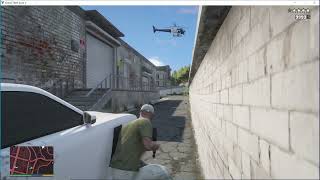
@Mrkai721 The thumbnails use AI for visual and aesthetic composition. But you're right, the images look bland and have nothing to do with the game itself. I removed the others and now I've put in the actual game images. Thanks for the tip, it was very helpful. I really appreciate it.