MP / DLC Menu | Load Online maps into Story Mode | Cayo Perico, North Yankton, Diamond Casino + 3.1.0 - Enhanced + Legacy Support



72.598
277
72.598
277
MP Map Menu v3.1
By Pakked / FlyHigh
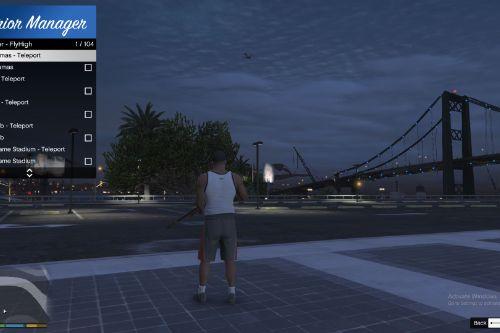
This mod adds a menu to GTA V which allows you to enable/disable GTA Online / Multiplayer DLC map content in Single Player.
It also includes quick teleports for access to:
- Diamond Casino
- Cayo Perico Island
- North Yankton / Prologue Map
Installation:
01. Install all requirements listed below.
02. Drop "MPMenu.dll" into your "scripts" folder.
03. Drop "MPMenu.ini" into your "scripts" folder.
04. Drop "LemonUI.SHVDN3.dll" into your "scripts" folder.
05. Start GTA V and press the configured menu key. Default is F5.
Important:
Do not place MPMenu.dll in the GTA root folder. It must go inside the "scripts" folder.
Prerequisites / Requirements:
ScriptHookV
http://www.dev-c.com/gtav/scripthookv/
Goes in the GTA V root folder.
ScriptHookVDotNet / SHVDNE
This mod is built for the ScriptHookVDotNet3 API.
Which version should you use
Legacy GTA V users:
- Use normal ScriptHookVDotNet v3.
- Download: https://www.gta5-mods.com/tools/scripthookv-net
- Goes in the GTA V root folder.
- SHVDNE can also be used on Legacy as a drop-in replacement, but it is not required for Legacy.
Enhanced GTA V users:
- Use ScriptHookVDotNet Enhanced / SHVDNE.
- Download: https://github.com/Chiheb-Bacha/ScriptHookVDotNetEnhanced/releases
- Goes in the GTA V root folder.
- SHVDNE is required for GTA V Enhanced because normal ScriptHookVDotNet only supports Legacy GTA V.
LemonUI for ScriptHookVDotNet3
https://github.com/LemonUIbyLemon/LemonUI
LemonUI.SHVDN3.dll goes in the "scripts" folder.
Make sure you use LemonUI.SHVDN3.dll, not the SHVDN2 version.
No Longer Required:
NativeUI is no longer required in v3.
This mod now uses LemonUI instead of NativeUI.
Default Keybinds:
Open Menu = F5
The keybinds can be changed in "MPMenu.ini".
MPMenu.ini Example:
[Hotkeys]
OpenMenu=F5
Optional direct hotkeys. Use None to disable.
ToggleMPMaps=None
EnableMPMaps=None
DisableMPMaps=None
TeleportCasino=None
TeleportCayoPerico=None
TeleportNorthYankton=None
[Options]
Legacy support from older versions. Hotkeys/OpenMenu is preferred.
Open Menu=F5
Menu Options:
Enable DLC/MP Maps
- Enables GTA Online / Multiplayer DLC map content in Story Mode.
Disable DLC/MP Maps
- Returns the world to the Story Mode map state.
- If the player is on a DLC/special map, the player is moved to the closest safe mainland location first.
Map Teleports:
Diamond Casino
- Teleports the player to the Diamond Casino.
- If returning from Cayo Perico or North Yankton, the mod safely reloads San Andreas first.
Cayo Perico
-Loads Cayo Perico.
- Enables the Cayo minimap/pause-map mode.
- Reveals the Cayo main map instead of leaving it undiscovered.
- Ensures North Yankton is unloaded first to prevent map overlap.
North Yankton
- Loads the North Yankton / Prologue map.
- Enables the North Yankton/prologue minimap mode.
- Ensures Cayo Perico is unloaded first to prevent map overlap.
Notes:
This mod changes the active MP/DLC map state while in Single Player.
Cayo Perico and North Yankton use overlapping southeast world-space, so the mod keeps them exclusive.
This means only one of those special maps is loaded at a time.
The Cayo Perico map reveal is a runtime minimap/pause-map visibility toggle.
It should not permanently edit your save file discovery data.
Compatibility:
This mod should work alongside most other script mods.
If another mod is also forcing MP map state, Cayo Perico, North Yankton, or minimap modes, the last mod to apply its state may override the other.
Troubleshooting:
If the menu does not open:
- Make sure MPMenu.dll is inside the "scripts" folder.
- Make sure MPMenu.ini is inside the "scripts" folder.
- Make sure ScriptHookV is installed in the GTA V root folder.
- Make sure the correct ScriptHookVDotNet / SHVDNE version is installed for your game version.
- Make sure LemonUI.SHVDN3.dll is inside the "scripts" folder.
- Check that OpenMenu is set to a valid key in MPMenu.ini.
If you are on GTA V Legacy:
- Normal ScriptHookVDotNet v3 is fine.
- SHVDNE is optional for Legacy.
If you are on GTA V Enhanced:
- Use SHVDNE.
- Normal ScriptHookVDotNet is not supported for Enhanced.
If Cayo Perico or North Yankton appears unloaded:
- Try teleporting again after a few seconds.
- Avoid rapidly switching maps back-to-back.
- Make sure no other map loader is fighting the mod.
Changelog:
3.0
Changes:
- Rebuilt for ScriptHookVDotNet3.
- Replaced NativeUI with LemonUI.
- Added LemonUI menu to replace outdated NativeUI.
- Renamed Enable DLC/MP Maps and Disable DLC/MP Maps options.
- Added quick teleport submenu:
- Added Diamond Casino teleport.
- Added Cayo Perico teleport.
- Added North Yankton teleport.
- Added Cayo Perico minimap/pause-map support.
- Added Cayo Perico main map visibility/fog-of-war runtime toggle.
- Added North Yankton/prologue minimap mode.
- Added exclusive switching so Cayo Perico and North Yankton do not load at the same time.
- Added Loading text transition for indication of responsiveness.
- Added improved streaming/focus/collision handling before and after teleports.
- Added safe mainland teleporting when disabling MP maps from DLC/special map areas.
- Added casino exterior/door loading fix.
- Added optional direct hotkeys for toggling MP maps and teleporting.
Bug Fixes:
- Fixed missing SHVDN3 Hash enum by using local native hashes instead.
- Fixed Cayo Perico loading issue where the player could fall into water before the island streamed.
- Fixed Cayo Perico and North Yankton overlapping in the same southeast map space.
- Fixed casino teleport unnecessarily loading when already in Los Santos.
- Fixed missing Diamond Casino door/exterior streaming.
Known Bugs:
- North Yankton is a prologue map and may not behave exactly like normal freemode map content.
- If another map loader mod is active, map/minimap state may be overridden.
- Very fast repeated switching may still cause GTA streaming delays or crashes.
2.0
Features:
- New UI menu.
- Custom key bindings.
Bug Fixes:
- Fixed bug where the game could crash while initializing the mod.
- Fixed bug where the mod would disable MP maps in special cases.
1.0
- Initial release.
By Pakked / FlyHigh
This mod adds a menu to GTA V which allows you to enable/disable GTA Online / Multiplayer DLC map content in Single Player.
It also includes quick teleports for access to:
- Diamond Casino
- Cayo Perico Island
- North Yankton / Prologue Map
Installation:
01. Install all requirements listed below.
02. Drop "MPMenu.dll" into your "scripts" folder.
03. Drop "MPMenu.ini" into your "scripts" folder.
04. Drop "LemonUI.SHVDN3.dll" into your "scripts" folder.
05. Start GTA V and press the configured menu key. Default is F5.
Important:
Do not place MPMenu.dll in the GTA root folder. It must go inside the "scripts" folder.
Prerequisites / Requirements:
ScriptHookV
http://www.dev-c.com/gtav/scripthookv/
Goes in the GTA V root folder.
ScriptHookVDotNet / SHVDNE
This mod is built for the ScriptHookVDotNet3 API.
Which version should you use
Legacy GTA V users:
- Use normal ScriptHookVDotNet v3.
- Download: https://www.gta5-mods.com/tools/scripthookv-net
- Goes in the GTA V root folder.
- SHVDNE can also be used on Legacy as a drop-in replacement, but it is not required for Legacy.
Enhanced GTA V users:
- Use ScriptHookVDotNet Enhanced / SHVDNE.
- Download: https://github.com/Chiheb-Bacha/ScriptHookVDotNetEnhanced/releases
- Goes in the GTA V root folder.
- SHVDNE is required for GTA V Enhanced because normal ScriptHookVDotNet only supports Legacy GTA V.
LemonUI for ScriptHookVDotNet3
https://github.com/LemonUIbyLemon/LemonUI
LemonUI.SHVDN3.dll goes in the "scripts" folder.
Make sure you use LemonUI.SHVDN3.dll, not the SHVDN2 version.
No Longer Required:
NativeUI is no longer required in v3.
This mod now uses LemonUI instead of NativeUI.
Default Keybinds:
Open Menu = F5
The keybinds can be changed in "MPMenu.ini".
MPMenu.ini Example:
[Hotkeys]
OpenMenu=F5
Optional direct hotkeys. Use None to disable.
ToggleMPMaps=None
EnableMPMaps=None
DisableMPMaps=None
TeleportCasino=None
TeleportCayoPerico=None
TeleportNorthYankton=None
[Options]
Legacy support from older versions. Hotkeys/OpenMenu is preferred.
Open Menu=F5
Menu Options:
Enable DLC/MP Maps
- Enables GTA Online / Multiplayer DLC map content in Story Mode.
Disable DLC/MP Maps
- Returns the world to the Story Mode map state.
- If the player is on a DLC/special map, the player is moved to the closest safe mainland location first.
Map Teleports:
Diamond Casino
- Teleports the player to the Diamond Casino.
- If returning from Cayo Perico or North Yankton, the mod safely reloads San Andreas first.
Cayo Perico
-Loads Cayo Perico.
- Enables the Cayo minimap/pause-map mode.
- Reveals the Cayo main map instead of leaving it undiscovered.
- Ensures North Yankton is unloaded first to prevent map overlap.
North Yankton
- Loads the North Yankton / Prologue map.
- Enables the North Yankton/prologue minimap mode.
- Ensures Cayo Perico is unloaded first to prevent map overlap.
Notes:
This mod changes the active MP/DLC map state while in Single Player.
Cayo Perico and North Yankton use overlapping southeast world-space, so the mod keeps them exclusive.
This means only one of those special maps is loaded at a time.
The Cayo Perico map reveal is a runtime minimap/pause-map visibility toggle.
It should not permanently edit your save file discovery data.
Compatibility:
This mod should work alongside most other script mods.
If another mod is also forcing MP map state, Cayo Perico, North Yankton, or minimap modes, the last mod to apply its state may override the other.
Troubleshooting:
If the menu does not open:
- Make sure MPMenu.dll is inside the "scripts" folder.
- Make sure MPMenu.ini is inside the "scripts" folder.
- Make sure ScriptHookV is installed in the GTA V root folder.
- Make sure the correct ScriptHookVDotNet / SHVDNE version is installed for your game version.
- Make sure LemonUI.SHVDN3.dll is inside the "scripts" folder.
- Check that OpenMenu is set to a valid key in MPMenu.ini.
If you are on GTA V Legacy:
- Normal ScriptHookVDotNet v3 is fine.
- SHVDNE is optional for Legacy.
If you are on GTA V Enhanced:
- Use SHVDNE.
- Normal ScriptHookVDotNet is not supported for Enhanced.
If Cayo Perico or North Yankton appears unloaded:
- Try teleporting again after a few seconds.
- Avoid rapidly switching maps back-to-back.
- Make sure no other map loader is fighting the mod.
Changelog:
3.0
Changes:
- Rebuilt for ScriptHookVDotNet3.
- Replaced NativeUI with LemonUI.
- Added LemonUI menu to replace outdated NativeUI.
- Renamed Enable DLC/MP Maps and Disable DLC/MP Maps options.
- Added quick teleport submenu:
- Added Diamond Casino teleport.
- Added Cayo Perico teleport.
- Added North Yankton teleport.
- Added Cayo Perico minimap/pause-map support.
- Added Cayo Perico main map visibility/fog-of-war runtime toggle.
- Added North Yankton/prologue minimap mode.
- Added exclusive switching so Cayo Perico and North Yankton do not load at the same time.
- Added Loading text transition for indication of responsiveness.
- Added improved streaming/focus/collision handling before and after teleports.
- Added safe mainland teleporting when disabling MP maps from DLC/special map areas.
- Added casino exterior/door loading fix.
- Added optional direct hotkeys for toggling MP maps and teleporting.
Bug Fixes:
- Fixed missing SHVDN3 Hash enum by using local native hashes instead.
- Fixed Cayo Perico loading issue where the player could fall into water before the island streamed.
- Fixed Cayo Perico and North Yankton overlapping in the same southeast map space.
- Fixed casino teleport unnecessarily loading when already in Los Santos.
- Fixed missing Diamond Casino door/exterior streaming.
Known Bugs:
- North Yankton is a prologue map and may not behave exactly like normal freemode map content.
- If another map loader mod is active, map/minimap state may be overridden.
- Very fast repeated switching may still cause GTA streaming delays or crashes.
2.0
Features:
- New UI menu.
- Custom key bindings.
Bug Fixes:
- Fixed bug where the game could crash while initializing the mod.
- Fixed bug where the mod would disable MP maps in special cases.
1.0
- Initial release.
Poprvé nahráno: 19. říjen 2020
Poslední aktulizace: 19 hours ago
Last Downloaded: před minutou
113 Komentářů
More mods by FlyHigh / Pakked:
MP Map Menu v3.1
By Pakked / FlyHigh
This mod adds a menu to GTA V which allows you to enable/disable GTA Online / Multiplayer DLC map content in Single Player.
It also includes quick teleports for access to:
- Diamond Casino
- Cayo Perico Island
- North Yankton / Prologue Map
Installation:
01. Install all requirements listed below.
02. Drop "MPMenu.dll" into your "scripts" folder.
03. Drop "MPMenu.ini" into your "scripts" folder.
04. Drop "LemonUI.SHVDN3.dll" into your "scripts" folder.
05. Start GTA V and press the configured menu key. Default is F5.
Important:
Do not place MPMenu.dll in the GTA root folder. It must go inside the "scripts" folder.
Prerequisites / Requirements:
ScriptHookV
http://www.dev-c.com/gtav/scripthookv/
Goes in the GTA V root folder.
ScriptHookVDotNet / SHVDNE
This mod is built for the ScriptHookVDotNet3 API.
Which version should you use
Legacy GTA V users:
- Use normal ScriptHookVDotNet v3.
- Download: https://www.gta5-mods.com/tools/scripthookv-net
- Goes in the GTA V root folder.
- SHVDNE can also be used on Legacy as a drop-in replacement, but it is not required for Legacy.
Enhanced GTA V users:
- Use ScriptHookVDotNet Enhanced / SHVDNE.
- Download: https://github.com/Chiheb-Bacha/ScriptHookVDotNetEnhanced/releases
- Goes in the GTA V root folder.
- SHVDNE is required for GTA V Enhanced because normal ScriptHookVDotNet only supports Legacy GTA V.
LemonUI for ScriptHookVDotNet3
https://github.com/LemonUIbyLemon/LemonUI
LemonUI.SHVDN3.dll goes in the "scripts" folder.
Make sure you use LemonUI.SHVDN3.dll, not the SHVDN2 version.
No Longer Required:
NativeUI is no longer required in v3.
This mod now uses LemonUI instead of NativeUI.
Default Keybinds:
Open Menu = F5
The keybinds can be changed in "MPMenu.ini".
MPMenu.ini Example:
[Hotkeys]
OpenMenu=F5
Optional direct hotkeys. Use None to disable.
ToggleMPMaps=None
EnableMPMaps=None
DisableMPMaps=None
TeleportCasino=None
TeleportCayoPerico=None
TeleportNorthYankton=None
[Options]
Legacy support from older versions. Hotkeys/OpenMenu is preferred.
Open Menu=F5
Menu Options:
Enable DLC/MP Maps
- Enables GTA Online / Multiplayer DLC map content in Story Mode.
Disable DLC/MP Maps
- Returns the world to the Story Mode map state.
- If the player is on a DLC/special map, the player is moved to the closest safe mainland location first.
Map Teleports:
Diamond Casino
- Teleports the player to the Diamond Casino.
- If returning from Cayo Perico or North Yankton, the mod safely reloads San Andreas first.
Cayo Perico
-Loads Cayo Perico.
- Enables the Cayo minimap/pause-map mode.
- Reveals the Cayo main map instead of leaving it undiscovered.
- Ensures North Yankton is unloaded first to prevent map overlap.
North Yankton
- Loads the North Yankton / Prologue map.
- Enables the North Yankton/prologue minimap mode.
- Ensures Cayo Perico is unloaded first to prevent map overlap.
Notes:
This mod changes the active MP/DLC map state while in Single Player.
Cayo Perico and North Yankton use overlapping southeast world-space, so the mod keeps them exclusive.
This means only one of those special maps is loaded at a time.
The Cayo Perico map reveal is a runtime minimap/pause-map visibility toggle.
It should not permanently edit your save file discovery data.
Compatibility:
This mod should work alongside most other script mods.
If another mod is also forcing MP map state, Cayo Perico, North Yankton, or minimap modes, the last mod to apply its state may override the other.
Troubleshooting:
If the menu does not open:
- Make sure MPMenu.dll is inside the "scripts" folder.
- Make sure MPMenu.ini is inside the "scripts" folder.
- Make sure ScriptHookV is installed in the GTA V root folder.
- Make sure the correct ScriptHookVDotNet / SHVDNE version is installed for your game version.
- Make sure LemonUI.SHVDN3.dll is inside the "scripts" folder.
- Check that OpenMenu is set to a valid key in MPMenu.ini.
If you are on GTA V Legacy:
- Normal ScriptHookVDotNet v3 is fine.
- SHVDNE is optional for Legacy.
If you are on GTA V Enhanced:
- Use SHVDNE.
- Normal ScriptHookVDotNet is not supported for Enhanced.
If Cayo Perico or North Yankton appears unloaded:
- Try teleporting again after a few seconds.
- Avoid rapidly switching maps back-to-back.
- Make sure no other map loader is fighting the mod.
Changelog:
3.0
Changes:
- Rebuilt for ScriptHookVDotNet3.
- Replaced NativeUI with LemonUI.
- Added LemonUI menu to replace outdated NativeUI.
- Renamed Enable DLC/MP Maps and Disable DLC/MP Maps options.
- Added quick teleport submenu:
- Added Diamond Casino teleport.
- Added Cayo Perico teleport.
- Added North Yankton teleport.
- Added Cayo Perico minimap/pause-map support.
- Added Cayo Perico main map visibility/fog-of-war runtime toggle.
- Added North Yankton/prologue minimap mode.
- Added exclusive switching so Cayo Perico and North Yankton do not load at the same time.
- Added Loading text transition for indication of responsiveness.
- Added improved streaming/focus/collision handling before and after teleports.
- Added safe mainland teleporting when disabling MP maps from DLC/special map areas.
- Added casino exterior/door loading fix.
- Added optional direct hotkeys for toggling MP maps and teleporting.
Bug Fixes:
- Fixed missing SHVDN3 Hash enum by using local native hashes instead.
- Fixed Cayo Perico loading issue where the player could fall into water before the island streamed.
- Fixed Cayo Perico and North Yankton overlapping in the same southeast map space.
- Fixed casino teleport unnecessarily loading when already in Los Santos.
- Fixed missing Diamond Casino door/exterior streaming.
Known Bugs:
- North Yankton is a prologue map and may not behave exactly like normal freemode map content.
- If another map loader mod is active, map/minimap state may be overridden.
- Very fast repeated switching may still cause GTA streaming delays or crashes.
2.0
Features:
- New UI menu.
- Custom key bindings.
Bug Fixes:
- Fixed bug where the game could crash while initializing the mod.
- Fixed bug where the mod would disable MP maps in special cases.
1.0
- Initial release.
By Pakked / FlyHigh
This mod adds a menu to GTA V which allows you to enable/disable GTA Online / Multiplayer DLC map content in Single Player.
It also includes quick teleports for access to:
- Diamond Casino
- Cayo Perico Island
- North Yankton / Prologue Map
Installation:
01. Install all requirements listed below.
02. Drop "MPMenu.dll" into your "scripts" folder.
03. Drop "MPMenu.ini" into your "scripts" folder.
04. Drop "LemonUI.SHVDN3.dll" into your "scripts" folder.
05. Start GTA V and press the configured menu key. Default is F5.
Important:
Do not place MPMenu.dll in the GTA root folder. It must go inside the "scripts" folder.
Prerequisites / Requirements:
ScriptHookV
http://www.dev-c.com/gtav/scripthookv/
Goes in the GTA V root folder.
ScriptHookVDotNet / SHVDNE
This mod is built for the ScriptHookVDotNet3 API.
Which version should you use
Legacy GTA V users:
- Use normal ScriptHookVDotNet v3.
- Download: https://www.gta5-mods.com/tools/scripthookv-net
- Goes in the GTA V root folder.
- SHVDNE can also be used on Legacy as a drop-in replacement, but it is not required for Legacy.
Enhanced GTA V users:
- Use ScriptHookVDotNet Enhanced / SHVDNE.
- Download: https://github.com/Chiheb-Bacha/ScriptHookVDotNetEnhanced/releases
- Goes in the GTA V root folder.
- SHVDNE is required for GTA V Enhanced because normal ScriptHookVDotNet only supports Legacy GTA V.
LemonUI for ScriptHookVDotNet3
https://github.com/LemonUIbyLemon/LemonUI
LemonUI.SHVDN3.dll goes in the "scripts" folder.
Make sure you use LemonUI.SHVDN3.dll, not the SHVDN2 version.
No Longer Required:
NativeUI is no longer required in v3.
This mod now uses LemonUI instead of NativeUI.
Default Keybinds:
Open Menu = F5
The keybinds can be changed in "MPMenu.ini".
MPMenu.ini Example:
[Hotkeys]
OpenMenu=F5
Optional direct hotkeys. Use None to disable.
ToggleMPMaps=None
EnableMPMaps=None
DisableMPMaps=None
TeleportCasino=None
TeleportCayoPerico=None
TeleportNorthYankton=None
[Options]
Legacy support from older versions. Hotkeys/OpenMenu is preferred.
Open Menu=F5
Menu Options:
Enable DLC/MP Maps
- Enables GTA Online / Multiplayer DLC map content in Story Mode.
Disable DLC/MP Maps
- Returns the world to the Story Mode map state.
- If the player is on a DLC/special map, the player is moved to the closest safe mainland location first.
Map Teleports:
Diamond Casino
- Teleports the player to the Diamond Casino.
- If returning from Cayo Perico or North Yankton, the mod safely reloads San Andreas first.
Cayo Perico
-Loads Cayo Perico.
- Enables the Cayo minimap/pause-map mode.
- Reveals the Cayo main map instead of leaving it undiscovered.
- Ensures North Yankton is unloaded first to prevent map overlap.
North Yankton
- Loads the North Yankton / Prologue map.
- Enables the North Yankton/prologue minimap mode.
- Ensures Cayo Perico is unloaded first to prevent map overlap.
Notes:
This mod changes the active MP/DLC map state while in Single Player.
Cayo Perico and North Yankton use overlapping southeast world-space, so the mod keeps them exclusive.
This means only one of those special maps is loaded at a time.
The Cayo Perico map reveal is a runtime minimap/pause-map visibility toggle.
It should not permanently edit your save file discovery data.
Compatibility:
This mod should work alongside most other script mods.
If another mod is also forcing MP map state, Cayo Perico, North Yankton, or minimap modes, the last mod to apply its state may override the other.
Troubleshooting:
If the menu does not open:
- Make sure MPMenu.dll is inside the "scripts" folder.
- Make sure MPMenu.ini is inside the "scripts" folder.
- Make sure ScriptHookV is installed in the GTA V root folder.
- Make sure the correct ScriptHookVDotNet / SHVDNE version is installed for your game version.
- Make sure LemonUI.SHVDN3.dll is inside the "scripts" folder.
- Check that OpenMenu is set to a valid key in MPMenu.ini.
If you are on GTA V Legacy:
- Normal ScriptHookVDotNet v3 is fine.
- SHVDNE is optional for Legacy.
If you are on GTA V Enhanced:
- Use SHVDNE.
- Normal ScriptHookVDotNet is not supported for Enhanced.
If Cayo Perico or North Yankton appears unloaded:
- Try teleporting again after a few seconds.
- Avoid rapidly switching maps back-to-back.
- Make sure no other map loader is fighting the mod.
Changelog:
3.0
Changes:
- Rebuilt for ScriptHookVDotNet3.
- Replaced NativeUI with LemonUI.
- Added LemonUI menu to replace outdated NativeUI.
- Renamed Enable DLC/MP Maps and Disable DLC/MP Maps options.
- Added quick teleport submenu:
- Added Diamond Casino teleport.
- Added Cayo Perico teleport.
- Added North Yankton teleport.
- Added Cayo Perico minimap/pause-map support.
- Added Cayo Perico main map visibility/fog-of-war runtime toggle.
- Added North Yankton/prologue minimap mode.
- Added exclusive switching so Cayo Perico and North Yankton do not load at the same time.
- Added Loading text transition for indication of responsiveness.
- Added improved streaming/focus/collision handling before and after teleports.
- Added safe mainland teleporting when disabling MP maps from DLC/special map areas.
- Added casino exterior/door loading fix.
- Added optional direct hotkeys for toggling MP maps and teleporting.
Bug Fixes:
- Fixed missing SHVDN3 Hash enum by using local native hashes instead.
- Fixed Cayo Perico loading issue where the player could fall into water before the island streamed.
- Fixed Cayo Perico and North Yankton overlapping in the same southeast map space.
- Fixed casino teleport unnecessarily loading when already in Los Santos.
- Fixed missing Diamond Casino door/exterior streaming.
Known Bugs:
- North Yankton is a prologue map and may not behave exactly like normal freemode map content.
- If another map loader mod is active, map/minimap state may be overridden.
- Very fast repeated switching may still cause GTA streaming delays or crashes.
2.0
Features:
- New UI menu.
- Custom key bindings.
Bug Fixes:
- Fixed bug where the game could crash while initializing the mod.
- Fixed bug where the mod would disable MP maps in special cases.
1.0
- Initial release.
Poprvé nahráno: 19. říjen 2020
Poslední aktulizace: 19 hours ago
Last Downloaded: před minutou
 5mods on Discord

Hope you’re all doing well.
MP Map Menu v3.1 is out now with a lot of new fixes, features, and support for GTA V Enhanced.
This update is focused on making the mod compatible with both Legacy and Enhanced versions of GTA V, while also improving stability, map switching, new teleports, and overall usability.
If you have any suggestions for updates, fixes, or features you’d like to see added, feel free to let me know.
Thanks for the support!
@Fly-High hell yeah
Hey Team! Hope you're all doing well! I'm currently focused on updating this mod to make it fully compatible with both Legacy and Enhanced versions.
On top of that, I'm making a full return to the GTA Modding community and plan to be much more active again.
If you have any suggestions for future mods or updates you'd like to see added just let me know :)
@Fly-High Where is the download button?
@Fly-High Where is the place to click download?
@Starfox1993 Hey its There now :)
@aldian0 @Starfox1993 Hey its There now :)
@Brandon W WE ARE SO BACK!
@Loeski Update Is live, any issues shoot a comment
@saeedalnaaj1 Enhanced support added in latest update
@Fly-High Thank you
@Fly-High I am using gta 5 legacy, all the requirements are met but when pressing F5 the menu does not appear, likewise when changing to F7 and others the menu still does not appear, I tried replacing ScriptHookVDotNet v3 with SHVDNE but still the same menu does not appear in the game.
@aldian0 Same here
???
Crash on disabling mp maps after enabling them, on Enhanced version.
I'll test again and see if it was a one-time only thing.
@atlanticgamer82 Can you follow up if you got it working?
@aldian0 Hey sorry your having issues that's not what we want :( I'll do some troubleshooting on my end see if I can recreate your issue, Do you have any other script mods? (just to see if maybe they are interfering)
@Fly-High [17:32:38] [INFO] Fallbacking to the last deprecated API version 2.11.6 to compile ySFbikeA_afterburner.cs...
[17:32:39] [DEBUG] Successfully compiled ySFbikeA_afterburner.cs using deprecated API version 2.11.6. You could let ScriptHookVDotNet compile faster by adding ".2" before the extension name of the file name.
[17:32:39] [INFO] Found 1 script(s) in ySFbikeA_afterburner.cs resolved to API version 2.11.6 (script assembly version: 0.0.0.0, target API version: 2.11.6).
[17:32:39] [DEBUG] Loading assembly AlwaysOffRadio.dll ...
[17:32:39] [INFO] Found 1 script(s) in AlwaysOffRadio.dll resolved to API version 3.7.0 (script assembly version: 1.0.0.0, target API version: 3.0.2).
[17:32:39] [DEBUG] Loading assembly BikerMeleeInSP.dll ...
[17:32:39] [INFO] Found 2 script(s) in BikerMeleeInSP.dll resolved to API version 3.7.0 (script assembly version: 1.0.0.0, target API version: 3.7.0).
[17:32:39] [DEBUG] Loading assembly IndoPlatFinal.dll ...
[17:32:39] [INFO] Found 1 script(s) in IndoPlatFinal.dll resolved to API version 3.7.0 (script assembly version: 1.0.0.0, target API version: 3.7.0).
[17:32:39] [DEBUG] Loading assembly LemonUI.SHVDN3.dll ...
[17:32:39] [INFO] Found 0 script(s) in LemonUI.SHVDN3.dll (script assembly version: 2.2.0.0, target API version: 3.6.0).
[17:32:39] [DEBUG] Loading assembly MPMenu.dll ...
[17:32:39] [WARNING] Unable to resolve API version 3.9.0.
[17:32:39] [ERROR] Failed to load script assembly MPMenu.dll when searching for script types because there is an assembly that the script tried to load as a dependency but couldn't. Exception message: Unable to load one or more of the requested types. Retrieve the LoaderExceptions property for more information.
First LoaderException message (which tells what assembly is missing): System.IO.FileNotFoundException: Could not load file or assembly 'ScriptHookVDotNet3, Version=3.9.0.0, Culture=neutral, PublicKeyToken=null' or one of its dependencies. The system cannot find the file specified.
File name: 'ScriptHookVDotNet3, Version=3.9.0.0, Culture=neutral, PublicKeyToken=null'
@Fly-High hey so Idk if its jus me but the menu doesnt pop up for me what so ever, Before you ask, yes I have all the script hook mods and things like lemon ui necessary to work the mod, I even removed almost every single one of my mods just to isolate this one and still nothing
im running legacy btw