VehicleExhaustHeat(Legacy & Enhanced) 1.0.2



340
22
340
22
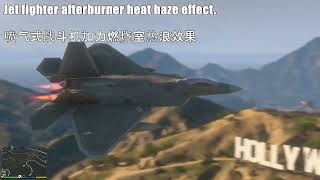
VehicleExhaustHeat is a lightweight GTA V script that adds realistic heat haze/exhaust effects to vehicle exhaust pipe positions. When you press the accelerator, the exhaust pipes emit dynamic, semi-transparent heat haze particles. The particle transparency smoothly changes with throttle depth, making your vehicles (including cars and jet fighters) more immersive when driving.
This script uses a per-vehicle independent configuration approach, allowing you to adjust particle scaling and position offsets for different vehicle models individually, thus perfectly fitting various original or MOD vehicles and avoiding particle misalignment or size mismatch issues. In particular, the script includes the "afterburner" bone by default, which perfectly supports jet fighters. By adjusting the scaling parameters, you can achieve a variety of visual effects from subtle heat haze to exaggerated flames.
[Required Plugins]
This script is developed based on ScriptHookVDotNet. Before running, please ensure the following dependencies are correctly installed:
ScriptHookV (http://www.dev-c.com/gta5/scripthookv)
dinput8 dll (provided with ScriptHookV)
ScriptHookVDotNet-v3.7.0 and above, or the Enhanced version SHVDNE.(https://github.com/Chiheb-Bacha/scripthookvdotnetenhanced/releases)
.NET Framework 4.8 or higher
[Core Features]
Dynamic Particle Effects
Adds realistic heat haze/exhaust effects to vehicle exhaust pipes, with a natural and realistic appearance.
Particle transparency changes in real-time with throttle input: approximately 40% transparency at idle, reaching 100% at full throttle, with smooth and fluid transitions.
Particle size (scale) can be adjusted globally or individually via the configuration file, defaulting to 4.5.
Intelligent Vehicle Recognition
Supports matching specific vehicle models via vehicle model hash. You can set independent parameters for different vehicles in the configuration file.
Supports any vehicle, including various MOD vehicles, by extending the configuration file.
Optimized for Jet Fighters
You can easily configure large scale values (e.g., 8.0~12.0) for fighter models (such as LAZER, HYDRA, etc.) to produce exaggerated blazing flame effects, simulating the visual impact of afterburner thrust.
With appropriate Z-axis offset, particles can be precisely positioned at the center of the exhaust nozzle to avoid misalignment.
Rich Customization Options
Scale: Controls overall particle size, recommended range 0.5 ~ 12.0 (fighters can be set higher).
Offset: Fine-tunes particle position on X/Y/Z axes to resolve issues with inaccurate exhaust pipe bone positions.
Hot Configuration Reload
Press F5 (default) to reload the configuration file without restarting the game, taking effect immediately.
Debug mode (DebugMode) displays real-time parameters, particle count, throttle values, etc., for easy fine-tuning.
[Configuration File Description (VehicleExhaustHeat ini)]
After the first run, the script automatically generates VehicleExhaustHeat ini in the scripts/ folder. You can open and modify it with any text editor.
Example content is as follows:
; Global settings
ReloadKey=F5 ; Hot reload key
DebugMode=false ; Whether to display debug information (true/false)
; Vehicle-specific configuration (format: [Model Hash]) If you don't know the hash values of some vehicles, you can enable developer mode to check the specific hash value of the vehicle you are currently driving.
[0xB39B0AE6]
Scale=0.5
Offset=0,0,0
[0x7AE1FBE7]
Scale=4.0
Offset=0,-5,0
Parameter descriptions:
ReloadKey: Virtual key code for hot reload key (reference: F5=116, F6=117, Space=32).
DebugMode: When enabled, the top-left corner of the screen will display debug data such as current vehicle hash, throttle value, particle count, etc.
Scale: Particle scaling factor. For fighters, it is recommended to set between 8.0 ~ 15.0 for a striking visual impact.
Offset: Offset in the vehicle's local coordinate system (X axis: front/back, Y axis: left/right, Z axis: up/down). Fighters usually require fine-tuning the particles backward (negative X) or downward (negative Z).
(If you want a specific vehicle to have no effect, simply do not add a configuration entry for it.)
[Installation & Usage]
Place VehicleExhaustHeat dll into your scripts folder (create it if it doesn't exist).
Launch the game – the script will automatically generate the VehicleExhaustHeat ini configuration file.
(Optional) Modify the configuration file as needed and press F5 to hot reload.
Enter a supported vehicle (including fighters), press the accelerator, and you will see heat haze particles emitting from the exhaust pipes or exhaust nozzles.
In debug mode, you can observe parameter changes in real-time, making it easy to adjust for the most satisfactory effect.
[Advanced Features]
Smooth Transparency Transition
Particle transparency does not change abruptly but smoothly follows throttle changes, avoiding flickering and abruptness, resulting in a more natural visual effect.
Automatic Cleanup and Recreation
When the player leaves the vehicle, particles are automatically removed to save performance.
When the player re-enters the vehicle and the engine is running, particles are recreated and resume their previous transparency state.
[Important Notes]
This script only modifies visual effects and does not affect vehicle physical performance or driving feel.
If particle effects fail to display, check whether the vehicle model hash has been correctly added to the configuration file.
If you use many MOD vehicles, it is recommended to configure the Offset for each vehicle individually for the best visual positioning.
Do not use simultaneously with other exhaust particle scripts to avoid conflicts or double particles.
[Changelog]
v1.0.0 (Initial Release)
Implemented dynamic heat haze particle effects based on throttle depth.
Supports independent configuration of scaling and offset for each vehicle via INI file.
Provides hot reload (F5) and debug mode.
Smooth particle transparency transitions for a fluid visual experience.
Automatic cleanup and recreation mechanism to save system resources.
v1.0.1
Slightly optimized the effect curve of the heat haze effect, further reducing the heat haze effect at idle.
Fixed compatibility for some players using ScriptHookVDotNet-v3.7.0-nightly.166.
v1.0.2
Fixed script compatibility. Now you can use any 3.7.0 version of SHVDN, and it is also compatible with the Enhanced version SHVDNE.
Enjoy your exhaust pipe heat haze and fighter jet flames!
This script uses a per-vehicle independent configuration approach, allowing you to adjust particle scaling and position offsets for different vehicle models individually, thus perfectly fitting various original or MOD vehicles and avoiding particle misalignment or size mismatch issues. In particular, the script includes the "afterburner" bone by default, which perfectly supports jet fighters. By adjusting the scaling parameters, you can achieve a variety of visual effects from subtle heat haze to exaggerated flames.
[Required Plugins]
This script is developed based on ScriptHookVDotNet. Before running, please ensure the following dependencies are correctly installed:
ScriptHookV (http://www.dev-c.com/gta5/scripthookv)
dinput8 dll (provided with ScriptHookV)
ScriptHookVDotNet-v3.7.0 and above, or the Enhanced version SHVDNE.(https://github.com/Chiheb-Bacha/scripthookvdotnetenhanced/releases)
.NET Framework 4.8 or higher
[Core Features]
Dynamic Particle Effects
Adds realistic heat haze/exhaust effects to vehicle exhaust pipes, with a natural and realistic appearance.
Particle transparency changes in real-time with throttle input: approximately 40% transparency at idle, reaching 100% at full throttle, with smooth and fluid transitions.
Particle size (scale) can be adjusted globally or individually via the configuration file, defaulting to 4.5.
Intelligent Vehicle Recognition
Supports matching specific vehicle models via vehicle model hash. You can set independent parameters for different vehicles in the configuration file.
Supports any vehicle, including various MOD vehicles, by extending the configuration file.
Optimized for Jet Fighters
You can easily configure large scale values (e.g., 8.0~12.0) for fighter models (such as LAZER, HYDRA, etc.) to produce exaggerated blazing flame effects, simulating the visual impact of afterburner thrust.
With appropriate Z-axis offset, particles can be precisely positioned at the center of the exhaust nozzle to avoid misalignment.
Rich Customization Options
Scale: Controls overall particle size, recommended range 0.5 ~ 12.0 (fighters can be set higher).
Offset: Fine-tunes particle position on X/Y/Z axes to resolve issues with inaccurate exhaust pipe bone positions.
Hot Configuration Reload
Press F5 (default) to reload the configuration file without restarting the game, taking effect immediately.
Debug mode (DebugMode) displays real-time parameters, particle count, throttle values, etc., for easy fine-tuning.
[Configuration File Description (VehicleExhaustHeat ini)]
After the first run, the script automatically generates VehicleExhaustHeat ini in the scripts/ folder. You can open and modify it with any text editor.
Example content is as follows:
; Global settings
ReloadKey=F5 ; Hot reload key
DebugMode=false ; Whether to display debug information (true/false)
; Vehicle-specific configuration (format: [Model Hash]) If you don't know the hash values of some vehicles, you can enable developer mode to check the specific hash value of the vehicle you are currently driving.
[0xB39B0AE6]
Scale=0.5
Offset=0,0,0
[0x7AE1FBE7]
Scale=4.0
Offset=0,-5,0
Parameter descriptions:
ReloadKey: Virtual key code for hot reload key (reference: F5=116, F6=117, Space=32).
DebugMode: When enabled, the top-left corner of the screen will display debug data such as current vehicle hash, throttle value, particle count, etc.
Scale: Particle scaling factor. For fighters, it is recommended to set between 8.0 ~ 15.0 for a striking visual impact.
Offset: Offset in the vehicle's local coordinate system (X axis: front/back, Y axis: left/right, Z axis: up/down). Fighters usually require fine-tuning the particles backward (negative X) or downward (negative Z).
(If you want a specific vehicle to have no effect, simply do not add a configuration entry for it.)
[Installation & Usage]
Place VehicleExhaustHeat dll into your scripts folder (create it if it doesn't exist).
Launch the game – the script will automatically generate the VehicleExhaustHeat ini configuration file.
(Optional) Modify the configuration file as needed and press F5 to hot reload.
Enter a supported vehicle (including fighters), press the accelerator, and you will see heat haze particles emitting from the exhaust pipes or exhaust nozzles.
In debug mode, you can observe parameter changes in real-time, making it easy to adjust for the most satisfactory effect.
[Advanced Features]
Smooth Transparency Transition
Particle transparency does not change abruptly but smoothly follows throttle changes, avoiding flickering and abruptness, resulting in a more natural visual effect.
Automatic Cleanup and Recreation
When the player leaves the vehicle, particles are automatically removed to save performance.
When the player re-enters the vehicle and the engine is running, particles are recreated and resume their previous transparency state.
[Important Notes]
This script only modifies visual effects and does not affect vehicle physical performance or driving feel.
If particle effects fail to display, check whether the vehicle model hash has been correctly added to the configuration file.
If you use many MOD vehicles, it is recommended to configure the Offset for each vehicle individually for the best visual positioning.
Do not use simultaneously with other exhaust particle scripts to avoid conflicts or double particles.
[Changelog]
v1.0.0 (Initial Release)
Implemented dynamic heat haze particle effects based on throttle depth.
Supports independent configuration of scaling and offset for each vehicle via INI file.
Provides hot reload (F5) and debug mode.
Smooth particle transparency transitions for a fluid visual experience.
Automatic cleanup and recreation mechanism to save system resources.
v1.0.1
Slightly optimized the effect curve of the heat haze effect, further reducing the heat haze effect at idle.
Fixed compatibility for some players using ScriptHookVDotNet-v3.7.0-nightly.166.
v1.0.2
Fixed script compatibility. Now you can use any 3.7.0 version of SHVDN, and it is also compatible with the Enhanced version SHVDNE.
Enjoy your exhaust pipe heat haze and fighter jet flames!
Poprvé nahráno: před 2 dny
Poslední aktulizace: před jedním dnem
Last Downloaded: před 5 minutami
21 Komentářů
More mods by Lisztdreams:
VehicleExhaustHeat is a lightweight GTA V script that adds realistic heat haze/exhaust effects to vehicle exhaust pipe positions. When you press the accelerator, the exhaust pipes emit dynamic, semi-transparent heat haze particles. The particle transparency smoothly changes with throttle depth, making your vehicles (including cars and jet fighters) more immersive when driving.
This script uses a per-vehicle independent configuration approach, allowing you to adjust particle scaling and position offsets for different vehicle models individually, thus perfectly fitting various original or MOD vehicles and avoiding particle misalignment or size mismatch issues. In particular, the script includes the "afterburner" bone by default, which perfectly supports jet fighters. By adjusting the scaling parameters, you can achieve a variety of visual effects from subtle heat haze to exaggerated flames.
[Required Plugins]
This script is developed based on ScriptHookVDotNet. Before running, please ensure the following dependencies are correctly installed:
ScriptHookV (http://www.dev-c.com/gta5/scripthookv)
dinput8 dll (provided with ScriptHookV)
ScriptHookVDotNet-v3.7.0 and above, or the Enhanced version SHVDNE.(https://github.com/Chiheb-Bacha/scripthookvdotnetenhanced/releases)
.NET Framework 4.8 or higher
[Core Features]
Dynamic Particle Effects
Adds realistic heat haze/exhaust effects to vehicle exhaust pipes, with a natural and realistic appearance.
Particle transparency changes in real-time with throttle input: approximately 40% transparency at idle, reaching 100% at full throttle, with smooth and fluid transitions.
Particle size (scale) can be adjusted globally or individually via the configuration file, defaulting to 4.5.
Intelligent Vehicle Recognition
Supports matching specific vehicle models via vehicle model hash. You can set independent parameters for different vehicles in the configuration file.
Supports any vehicle, including various MOD vehicles, by extending the configuration file.
Optimized for Jet Fighters
You can easily configure large scale values (e.g., 8.0~12.0) for fighter models (such as LAZER, HYDRA, etc.) to produce exaggerated blazing flame effects, simulating the visual impact of afterburner thrust.
With appropriate Z-axis offset, particles can be precisely positioned at the center of the exhaust nozzle to avoid misalignment.
Rich Customization Options
Scale: Controls overall particle size, recommended range 0.5 ~ 12.0 (fighters can be set higher).
Offset: Fine-tunes particle position on X/Y/Z axes to resolve issues with inaccurate exhaust pipe bone positions.
Hot Configuration Reload
Press F5 (default) to reload the configuration file without restarting the game, taking effect immediately.
Debug mode (DebugMode) displays real-time parameters, particle count, throttle values, etc., for easy fine-tuning.
[Configuration File Description (VehicleExhaustHeat ini)]
After the first run, the script automatically generates VehicleExhaustHeat ini in the scripts/ folder. You can open and modify it with any text editor.
Example content is as follows:
; Global settings
ReloadKey=F5 ; Hot reload key
DebugMode=false ; Whether to display debug information (true/false)
; Vehicle-specific configuration (format: [Model Hash]) If you don't know the hash values of some vehicles, you can enable developer mode to check the specific hash value of the vehicle you are currently driving.
[0xB39B0AE6]
Scale=0.5
Offset=0,0,0
[0x7AE1FBE7]
Scale=4.0
Offset=0,-5,0
Parameter descriptions:
ReloadKey: Virtual key code for hot reload key (reference: F5=116, F6=117, Space=32).
DebugMode: When enabled, the top-left corner of the screen will display debug data such as current vehicle hash, throttle value, particle count, etc.
Scale: Particle scaling factor. For fighters, it is recommended to set between 8.0 ~ 15.0 for a striking visual impact.
Offset: Offset in the vehicle's local coordinate system (X axis: front/back, Y axis: left/right, Z axis: up/down). Fighters usually require fine-tuning the particles backward (negative X) or downward (negative Z).
(If you want a specific vehicle to have no effect, simply do not add a configuration entry for it.)
[Installation & Usage]
Place VehicleExhaustHeat dll into your scripts folder (create it if it doesn't exist).
Launch the game – the script will automatically generate the VehicleExhaustHeat ini configuration file.
(Optional) Modify the configuration file as needed and press F5 to hot reload.
Enter a supported vehicle (including fighters), press the accelerator, and you will see heat haze particles emitting from the exhaust pipes or exhaust nozzles.
In debug mode, you can observe parameter changes in real-time, making it easy to adjust for the most satisfactory effect.
[Advanced Features]
Smooth Transparency Transition
Particle transparency does not change abruptly but smoothly follows throttle changes, avoiding flickering and abruptness, resulting in a more natural visual effect.
Automatic Cleanup and Recreation
When the player leaves the vehicle, particles are automatically removed to save performance.
When the player re-enters the vehicle and the engine is running, particles are recreated and resume their previous transparency state.
[Important Notes]
This script only modifies visual effects and does not affect vehicle physical performance or driving feel.
If particle effects fail to display, check whether the vehicle model hash has been correctly added to the configuration file.
If you use many MOD vehicles, it is recommended to configure the Offset for each vehicle individually for the best visual positioning.
Do not use simultaneously with other exhaust particle scripts to avoid conflicts or double particles.
[Changelog]
v1.0.0 (Initial Release)
Implemented dynamic heat haze particle effects based on throttle depth.
Supports independent configuration of scaling and offset for each vehicle via INI file.
Provides hot reload (F5) and debug mode.
Smooth particle transparency transitions for a fluid visual experience.
Automatic cleanup and recreation mechanism to save system resources.
v1.0.1
Slightly optimized the effect curve of the heat haze effect, further reducing the heat haze effect at idle.
Fixed compatibility for some players using ScriptHookVDotNet-v3.7.0-nightly.166.
v1.0.2
Fixed script compatibility. Now you can use any 3.7.0 version of SHVDN, and it is also compatible with the Enhanced version SHVDNE.
Enjoy your exhaust pipe heat haze and fighter jet flames!
This script uses a per-vehicle independent configuration approach, allowing you to adjust particle scaling and position offsets for different vehicle models individually, thus perfectly fitting various original or MOD vehicles and avoiding particle misalignment or size mismatch issues. In particular, the script includes the "afterburner" bone by default, which perfectly supports jet fighters. By adjusting the scaling parameters, you can achieve a variety of visual effects from subtle heat haze to exaggerated flames.
[Required Plugins]
This script is developed based on ScriptHookVDotNet. Before running, please ensure the following dependencies are correctly installed:
ScriptHookV (http://www.dev-c.com/gta5/scripthookv)
dinput8 dll (provided with ScriptHookV)
ScriptHookVDotNet-v3.7.0 and above, or the Enhanced version SHVDNE.(https://github.com/Chiheb-Bacha/scripthookvdotnetenhanced/releases)
.NET Framework 4.8 or higher
[Core Features]
Dynamic Particle Effects
Adds realistic heat haze/exhaust effects to vehicle exhaust pipes, with a natural and realistic appearance.
Particle transparency changes in real-time with throttle input: approximately 40% transparency at idle, reaching 100% at full throttle, with smooth and fluid transitions.
Particle size (scale) can be adjusted globally or individually via the configuration file, defaulting to 4.5.
Intelligent Vehicle Recognition
Supports matching specific vehicle models via vehicle model hash. You can set independent parameters for different vehicles in the configuration file.
Supports any vehicle, including various MOD vehicles, by extending the configuration file.
Optimized for Jet Fighters
You can easily configure large scale values (e.g., 8.0~12.0) for fighter models (such as LAZER, HYDRA, etc.) to produce exaggerated blazing flame effects, simulating the visual impact of afterburner thrust.
With appropriate Z-axis offset, particles can be precisely positioned at the center of the exhaust nozzle to avoid misalignment.
Rich Customization Options
Scale: Controls overall particle size, recommended range 0.5 ~ 12.0 (fighters can be set higher).
Offset: Fine-tunes particle position on X/Y/Z axes to resolve issues with inaccurate exhaust pipe bone positions.
Hot Configuration Reload
Press F5 (default) to reload the configuration file without restarting the game, taking effect immediately.
Debug mode (DebugMode) displays real-time parameters, particle count, throttle values, etc., for easy fine-tuning.
[Configuration File Description (VehicleExhaustHeat ini)]
After the first run, the script automatically generates VehicleExhaustHeat ini in the scripts/ folder. You can open and modify it with any text editor.
Example content is as follows:
; Global settings
ReloadKey=F5 ; Hot reload key
DebugMode=false ; Whether to display debug information (true/false)
; Vehicle-specific configuration (format: [Model Hash]) If you don't know the hash values of some vehicles, you can enable developer mode to check the specific hash value of the vehicle you are currently driving.
[0xB39B0AE6]
Scale=0.5
Offset=0,0,0
[0x7AE1FBE7]
Scale=4.0
Offset=0,-5,0
Parameter descriptions:
ReloadKey: Virtual key code for hot reload key (reference: F5=116, F6=117, Space=32).
DebugMode: When enabled, the top-left corner of the screen will display debug data such as current vehicle hash, throttle value, particle count, etc.
Scale: Particle scaling factor. For fighters, it is recommended to set between 8.0 ~ 15.0 for a striking visual impact.
Offset: Offset in the vehicle's local coordinate system (X axis: front/back, Y axis: left/right, Z axis: up/down). Fighters usually require fine-tuning the particles backward (negative X) or downward (negative Z).
(If you want a specific vehicle to have no effect, simply do not add a configuration entry for it.)
[Installation & Usage]
Place VehicleExhaustHeat dll into your scripts folder (create it if it doesn't exist).
Launch the game – the script will automatically generate the VehicleExhaustHeat ini configuration file.
(Optional) Modify the configuration file as needed and press F5 to hot reload.
Enter a supported vehicle (including fighters), press the accelerator, and you will see heat haze particles emitting from the exhaust pipes or exhaust nozzles.
In debug mode, you can observe parameter changes in real-time, making it easy to adjust for the most satisfactory effect.
[Advanced Features]
Smooth Transparency Transition
Particle transparency does not change abruptly but smoothly follows throttle changes, avoiding flickering and abruptness, resulting in a more natural visual effect.
Automatic Cleanup and Recreation
When the player leaves the vehicle, particles are automatically removed to save performance.
When the player re-enters the vehicle and the engine is running, particles are recreated and resume their previous transparency state.
[Important Notes]
This script only modifies visual effects and does not affect vehicle physical performance or driving feel.
If particle effects fail to display, check whether the vehicle model hash has been correctly added to the configuration file.
If you use many MOD vehicles, it is recommended to configure the Offset for each vehicle individually for the best visual positioning.
Do not use simultaneously with other exhaust particle scripts to avoid conflicts or double particles.
[Changelog]
v1.0.0 (Initial Release)
Implemented dynamic heat haze particle effects based on throttle depth.
Supports independent configuration of scaling and offset for each vehicle via INI file.
Provides hot reload (F5) and debug mode.
Smooth particle transparency transitions for a fluid visual experience.
Automatic cleanup and recreation mechanism to save system resources.
v1.0.1
Slightly optimized the effect curve of the heat haze effect, further reducing the heat haze effect at idle.
Fixed compatibility for some players using ScriptHookVDotNet-v3.7.0-nightly.166.
v1.0.2
Fixed script compatibility. Now you can use any 3.7.0 version of SHVDN, and it is also compatible with the Enhanced version SHVDNE.
Enjoy your exhaust pipe heat haze and fighter jet flames!
Poprvé nahráno: před 2 dny
Poslední aktulizace: před jedním dnem
Last Downloaded: před 5 minutami
 5mods on Discord

This looks nice. Gonna install this one and try it. :)
@Pinkjughead01 Feedback welcome.
@Lisztdreams , Bro it`s Amazing Mod ... But I have a lot of [ERROR]s ... :(
52 pages in Dot Net Console lol ...
It`s on nightly 166 & 3751 exe
And I can`t use last patch exe , because some scripts don`t work ... Sad .
@rashkasosi I just updated to the latest version of SHVDN as well, tested and fixed compatibility for this version. You can download version 1.0.1 and test the effect.
@Lisztdreams I have a error coming up when I move my character, mouse, or even press a button
Unhandled exception in script "VehicleExaustHeat"!
TypeLoadExpectation at VehicleExaustHeat.☐☐☐☐☐☐☐☐☐☐☐☐☐☐☐☐☐☐☐☐☐☐☐☐☐☐☐☐☐☐(Object , KeyEventArgs)
@Lisztdreams Really nice & adds to the overall realism.
Does it come with an ini file?
@Lisztdreams , thx Bro .. no errors after update to 1.0.1 ; Debug Mode works etc , but I don`t see Heat effect ... :(
+ I also don`t see hashes in ini file of My Cars ...
@rashkasosi Because this script requires you to manually add the hash value of the corresponding vehicle for it to take effect. You can enable debug mode, enter the vehicle you want to add, check its hash value in the top-left corner, then add it to the configuration file using the same format as the default parameters. After that, press F5 in-game to refresh the configuration and you're done.
@nj5050 Yes, it will generate an ini configuration file when the script runs for the first time, allowing you to customize parameters, add the hash values of corresponding vehicles, and fine-tune the effects.
@BatboyGaming_YT You may have downloaded the default 1.0.0 version, because I updated to 1.0.1 last night and forgot to set it as the main file. Sorry. You can download 1.0.1 and give it a try.
The best is should not use versions of ScriptHookVDotNet-v3.7.0-nightly.113 above for construction. The author broke some APIs in these versions, which are also noted on the homepage, or you can simply use shvdnEnh, which keeps the progress at 113
@JoyLucien Yes, so in the latest version 1.0.2, I fixed the compatibility issue with SHVDN. Now you can use any 3.7.0 version of SHVDN and the Enhanced version SHVDNE.
@Lisztdreams , yes I tried to add manually like [0x2BEC3CBE] for BUffalo2 , even change all values such Scale=42.5
Offset=0.1,0.1,0.1 etc , and I see these values in Debug corner after Reload , but no changes :(
Can I add lines with Car name like // Buffalo2 , // Police3 for all hashes ?
@rashkasosi Hi, just a quick check — after you added the hash, saved the INI, and pressed F5 in-game, when you're sitting in the Buffalo2, look at the top-left debug text (it's in Chinese). Does it show 支持: 是 or 支持: 否 for that car?
· 支持: 是 → the config loaded correctly
· 支持: 否 → the hash wasn't recognised, likely a formatting issue in your INI
Let me know which one you see, and we can fix it from there.
@Lisztdreams Could you possibly make it a little less complicated (especially for newbies), where user can add the string model name of the vehicle, instead of needing to lookup the exact hash values for such vehicles?
@Lisztdreams I don`t see this , just ☐☐☐☐☐☐☐☐☐☐☐☐☐☐☐☐☐☐ in English version , sry ...
@nj5050 after entering any vehicle - You can see hash in upper-left corner & just type it with keyboard to the ini , hehe ... But it`s not problem for Me , looks like it simply does not work for some reason :c
Would be good to see in future updates the bind key to add hash into ini file automatically , like in Afterburners.dll (DotNet) :
[SETTINGS]
MasterKey = F11
File with added hashes \ aircraft names - Afterburners.txt etc ...
@nj5050 Yeah, this will be in my update plan.
awesome mod but too much work for us. we'd appreciate a plug n play without having to look up for hashes and edit the ini. 5 star regardless but im not using it
Is it possible to make the mod apply once entered aircraft -> press eg, F1-F12 whatsoever -> automatically apply the aircraft hash to the mod.