Vehicle Mileage System 2.0



![Working Mk II Ammunation for NPCs on Legacy & Enhanced [ WIP | .NET ]](https://img.gta5-mods.com/q75-w500-h333-cfill/images/working-mk-ii-ammunation-for-npcs-on-legacy-enhanced-wip-net/2b3a88-ap.jpg "Working Mk II Ammunation for NPCs on Legacy & Enhanced [ WIP | .NET ]")


865
15
865
15
VehicleMileage — GTA V Vehicle Mileage Tracker Script
This is a lightweight ScriptHookVDotNet script that automatically tracks each vehicle's trip mileage and total cumulative mileage. All mileage data is automatically saved to a config file, so even if you switch vehicles, die, or restart the game, the accumulated mileage records remain intact and won't be lost. To avoid cluttering the config with random vehicles you only ride once, the script only saves vehicles that have accumulated more than 1 km of mileage, keeping the data clean.
Required Plugins:
ScriptHookV (latest version, compatible with your current game version)
ScriptHookVDotNet (v3, based on .NET Framework 4.8; if you're using older v2, adjust accordingly)
Main Features:
1. Trip & Total Mileage
For each vehicle, it independently tracks the distance driven since you entered (trip) and the total cumulative mileage across all driving sessions. Total mileage is permanent across sessions.
2. Dual Unit Display
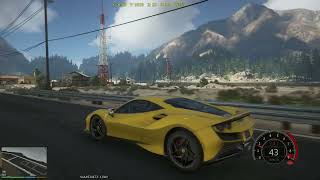
The on-screen HUD shows both kilometers and miles, no manual conversion needed.
3. Auto-Save, No Data Loss
Automatically saves mileage data every 30 seconds, and also saves immediately when your character dies. Even after switching vehicles, dying, or restarting the game, all recorded cumulative mileage is fully preserved.
4. Smart Filtering for Occasional Vehicles
To avoid filling the config file with one-time rides, the script only writes a vehicle's data to the INI file once its total cumulative mileage exceeds 1 km.
5. Custom Vehicle Names
You can map hard-to-remember model hashes (e.g., 0xB2C046E5) to custom names (like "Cyclone Brawler") via the config file, and the HUD will display the friendly name.
6. Hotkey to Reload Config
By default, press F5 to reload the INI file without restarting the script or game – handy for real-time adjustments to HUD position, name mapping, etc.
7. Adjustable HUD Position & Size
You can freely customize the display coordinates and scale via the config file.
------------------Script Config File Comments---------------------
Config File Location (scripts/VehicleMileage.ini):
The script will automatically generate a default config file when first run. You can also edit it manually. The file uses standard INI format with four sections:
[HUD]
HUD=0.25,0.972,0.3
Controls the position and size of the on-screen text. Three values separated by commas: X coordinate, Y coordinate, Scale.
Coordinate range 0.0 ~ 1.0 (bottom-left of screen is (0,0), top-right is (1,1)). Default places it slightly left of bottom center.
[Keys]
ReloadKey=F5
Hotkey to reload the config. You can change it to any System.Windows.Forms.Keys enum value (e.g., F6, R, F9 – it's recommended to use function keys to avoid conflicts).
[Names]
0xB2C046E5=Cyclone Brawler
0x1234ABCD=My Beloved Car
This section lets you assign a friendly display name to a vehicle model hash.
Left side of the equals sign must be the model hash (with or without 0x prefix – the script will auto-complete it). Right side is your custom name.
If a vehicle is not defined here, the HUD will show its hexadecimal hash.
[Mileage]
0xB2C046E5=123.456
0x1234ABCD=9.870
Records the total cumulative mileage (in kilometers) for each vehicle.
The script only writes a vehicle to this section after it has accumulated more than 1 km, to avoid cluttering with temporary vehicles driven only a few meters.
If you want to manually adjust a vehicle's total mileage, simply change the number and reload the config. To delete a vehicle's record, remove its line.
Installation & Usage:
1. Make sure ScriptHookV and ScriptHookVDotNet are properly installed.
2. Copy VehicleMileage.dll into the "scripts" folder in your game root directory (create the folder if it doesn't exist).
3. Launch the game and go into Story Mode (Note: using mods online risks a ban, so only use in single-player or at your own risk).
4. Enter any vehicle – the HUD will instantly show the current vehicle's trip mileage and total cumulative mileage. All records are automatically saved in the background, and cumulative mileage won't be lost when switching vehicles, dying, or exiting the game.
5. Reload via hotkey: After editing the INI file, press F5 (or your custom key) in-game to apply changes without restarting.
6. Data management: Only vehicles driven more than 1 km will appear in the config file. Temporary rides leave no traces. If you want to clean up old data, just edit the [Mileage] section, save, then press the reload hotkey.
7. May every kilometer in Los Santos be full of memories!
v2.0 Update Contents:
1.Modified the mileage calculation logic: Previously, when players were inside a vehicle and teleported using tools like mods, the mileage would still be calculated. This has been fixed to only calculate the actual mileage driven on the wheels.
2.Added HUD content for current driving mileage: Now you can not only clearly see the total accumulated mileage of your beloved vehicle, but also clearly know the distance driven in the current trip.
3.Optimized the configuration file format and significantly streamlined the content: The original mileage file and naming file have been merged into a single VehicleMileage.ini configuration file.
4.Added a mechanism where only vehicles that have been driven for more than 1 kilometer will appear in the configuration file, ensuring that temporarily driven unfamiliar vehicles leave no traces.
This is a lightweight ScriptHookVDotNet script that automatically tracks each vehicle's trip mileage and total cumulative mileage. All mileage data is automatically saved to a config file, so even if you switch vehicles, die, or restart the game, the accumulated mileage records remain intact and won't be lost. To avoid cluttering the config with random vehicles you only ride once, the script only saves vehicles that have accumulated more than 1 km of mileage, keeping the data clean.
Required Plugins:
ScriptHookV (latest version, compatible with your current game version)
ScriptHookVDotNet (v3, based on .NET Framework 4.8; if you're using older v2, adjust accordingly)
Main Features:
1. Trip & Total Mileage
For each vehicle, it independently tracks the distance driven since you entered (trip) and the total cumulative mileage across all driving sessions. Total mileage is permanent across sessions.
2. Dual Unit Display
The on-screen HUD shows both kilometers and miles, no manual conversion needed.
3. Auto-Save, No Data Loss
Automatically saves mileage data every 30 seconds, and also saves immediately when your character dies. Even after switching vehicles, dying, or restarting the game, all recorded cumulative mileage is fully preserved.
4. Smart Filtering for Occasional Vehicles
To avoid filling the config file with one-time rides, the script only writes a vehicle's data to the INI file once its total cumulative mileage exceeds 1 km.
5. Custom Vehicle Names
You can map hard-to-remember model hashes (e.g., 0xB2C046E5) to custom names (like "Cyclone Brawler") via the config file, and the HUD will display the friendly name.
6. Hotkey to Reload Config
By default, press F5 to reload the INI file without restarting the script or game – handy for real-time adjustments to HUD position, name mapping, etc.
7. Adjustable HUD Position & Size
You can freely customize the display coordinates and scale via the config file.
------------------Script Config File Comments---------------------
Config File Location (scripts/VehicleMileage.ini):
The script will automatically generate a default config file when first run. You can also edit it manually. The file uses standard INI format with four sections:
[HUD]
HUD=0.25,0.972,0.3
Controls the position and size of the on-screen text. Three values separated by commas: X coordinate, Y coordinate, Scale.
Coordinate range 0.0 ~ 1.0 (bottom-left of screen is (0,0), top-right is (1,1)). Default places it slightly left of bottom center.
[Keys]
ReloadKey=F5
Hotkey to reload the config. You can change it to any System.Windows.Forms.Keys enum value (e.g., F6, R, F9 – it's recommended to use function keys to avoid conflicts).
[Names]
0xB2C046E5=Cyclone Brawler
0x1234ABCD=My Beloved Car
This section lets you assign a friendly display name to a vehicle model hash.
Left side of the equals sign must be the model hash (with or without 0x prefix – the script will auto-complete it). Right side is your custom name.
If a vehicle is not defined here, the HUD will show its hexadecimal hash.
[Mileage]
0xB2C046E5=123.456
0x1234ABCD=9.870
Records the total cumulative mileage (in kilometers) for each vehicle.
The script only writes a vehicle to this section after it has accumulated more than 1 km, to avoid cluttering with temporary vehicles driven only a few meters.
If you want to manually adjust a vehicle's total mileage, simply change the number and reload the config. To delete a vehicle's record, remove its line.
Installation & Usage:
1. Make sure ScriptHookV and ScriptHookVDotNet are properly installed.
2. Copy VehicleMileage.dll into the "scripts" folder in your game root directory (create the folder if it doesn't exist).
3. Launch the game and go into Story Mode (Note: using mods online risks a ban, so only use in single-player or at your own risk).
4. Enter any vehicle – the HUD will instantly show the current vehicle's trip mileage and total cumulative mileage. All records are automatically saved in the background, and cumulative mileage won't be lost when switching vehicles, dying, or exiting the game.
5. Reload via hotkey: After editing the INI file, press F5 (or your custom key) in-game to apply changes without restarting.
6. Data management: Only vehicles driven more than 1 km will appear in the config file. Temporary rides leave no traces. If you want to clean up old data, just edit the [Mileage] section, save, then press the reload hotkey.
7. May every kilometer in Los Santos be full of memories!
v2.0 Update Contents:
1.Modified the mileage calculation logic: Previously, when players were inside a vehicle and teleported using tools like mods, the mileage would still be calculated. This has been fixed to only calculate the actual mileage driven on the wheels.
2.Added HUD content for current driving mileage: Now you can not only clearly see the total accumulated mileage of your beloved vehicle, but also clearly know the distance driven in the current trip.
3.Optimized the configuration file format and significantly streamlined the content: The original mileage file and naming file have been merged into a single VehicleMileage.ini configuration file.
4.Added a mechanism where only vehicles that have been driven for more than 1 kilometer will appear in the configuration file, ensuring that temporarily driven unfamiliar vehicles leave no traces.
Poprvé nahráno: 20. prosinec 2025
Poslední aktulizace: před jedním dnem
Last Downloaded: 1 hour ago
13 Komentářů
VehicleMileage — GTA V Vehicle Mileage Tracker Script
This is a lightweight ScriptHookVDotNet script that automatically tracks each vehicle's trip mileage and total cumulative mileage. All mileage data is automatically saved to a config file, so even if you switch vehicles, die, or restart the game, the accumulated mileage records remain intact and won't be lost. To avoid cluttering the config with random vehicles you only ride once, the script only saves vehicles that have accumulated more than 1 km of mileage, keeping the data clean.
Required Plugins:
ScriptHookV (latest version, compatible with your current game version)
ScriptHookVDotNet (v3, based on .NET Framework 4.8; if you're using older v2, adjust accordingly)
Main Features:
1. Trip & Total Mileage
For each vehicle, it independently tracks the distance driven since you entered (trip) and the total cumulative mileage across all driving sessions. Total mileage is permanent across sessions.
2. Dual Unit Display
The on-screen HUD shows both kilometers and miles, no manual conversion needed.
3. Auto-Save, No Data Loss
Automatically saves mileage data every 30 seconds, and also saves immediately when your character dies. Even after switching vehicles, dying, or restarting the game, all recorded cumulative mileage is fully preserved.
4. Smart Filtering for Occasional Vehicles
To avoid filling the config file with one-time rides, the script only writes a vehicle's data to the INI file once its total cumulative mileage exceeds 1 km.
5. Custom Vehicle Names
You can map hard-to-remember model hashes (e.g., 0xB2C046E5) to custom names (like "Cyclone Brawler") via the config file, and the HUD will display the friendly name.
6. Hotkey to Reload Config
By default, press F5 to reload the INI file without restarting the script or game – handy for real-time adjustments to HUD position, name mapping, etc.
7. Adjustable HUD Position & Size
You can freely customize the display coordinates and scale via the config file.
------------------Script Config File Comments---------------------
Config File Location (scripts/VehicleMileage.ini):
The script will automatically generate a default config file when first run. You can also edit it manually. The file uses standard INI format with four sections:
[HUD]
HUD=0.25,0.972,0.3
Controls the position and size of the on-screen text. Three values separated by commas: X coordinate, Y coordinate, Scale.
Coordinate range 0.0 ~ 1.0 (bottom-left of screen is (0,0), top-right is (1,1)). Default places it slightly left of bottom center.
[Keys]
ReloadKey=F5
Hotkey to reload the config. You can change it to any System.Windows.Forms.Keys enum value (e.g., F6, R, F9 – it's recommended to use function keys to avoid conflicts).
[Names]
0xB2C046E5=Cyclone Brawler
0x1234ABCD=My Beloved Car
This section lets you assign a friendly display name to a vehicle model hash.
Left side of the equals sign must be the model hash (with or without 0x prefix – the script will auto-complete it). Right side is your custom name.
If a vehicle is not defined here, the HUD will show its hexadecimal hash.
[Mileage]
0xB2C046E5=123.456
0x1234ABCD=9.870
Records the total cumulative mileage (in kilometers) for each vehicle.
The script only writes a vehicle to this section after it has accumulated more than 1 km, to avoid cluttering with temporary vehicles driven only a few meters.
If you want to manually adjust a vehicle's total mileage, simply change the number and reload the config. To delete a vehicle's record, remove its line.
Installation & Usage:
1. Make sure ScriptHookV and ScriptHookVDotNet are properly installed.
2. Copy VehicleMileage.dll into the "scripts" folder in your game root directory (create the folder if it doesn't exist).
3. Launch the game and go into Story Mode (Note: using mods online risks a ban, so only use in single-player or at your own risk).
4. Enter any vehicle – the HUD will instantly show the current vehicle's trip mileage and total cumulative mileage. All records are automatically saved in the background, and cumulative mileage won't be lost when switching vehicles, dying, or exiting the game.
5. Reload via hotkey: After editing the INI file, press F5 (or your custom key) in-game to apply changes without restarting.
6. Data management: Only vehicles driven more than 1 km will appear in the config file. Temporary rides leave no traces. If you want to clean up old data, just edit the [Mileage] section, save, then press the reload hotkey.
7. May every kilometer in Los Santos be full of memories!
v2.0 Update Contents:
1.Modified the mileage calculation logic: Previously, when players were inside a vehicle and teleported using tools like mods, the mileage would still be calculated. This has been fixed to only calculate the actual mileage driven on the wheels.
2.Added HUD content for current driving mileage: Now you can not only clearly see the total accumulated mileage of your beloved vehicle, but also clearly know the distance driven in the current trip.
3.Optimized the configuration file format and significantly streamlined the content: The original mileage file and naming file have been merged into a single VehicleMileage.ini configuration file.
4.Added a mechanism where only vehicles that have been driven for more than 1 kilometer will appear in the configuration file, ensuring that temporarily driven unfamiliar vehicles leave no traces.
This is a lightweight ScriptHookVDotNet script that automatically tracks each vehicle's trip mileage and total cumulative mileage. All mileage data is automatically saved to a config file, so even if you switch vehicles, die, or restart the game, the accumulated mileage records remain intact and won't be lost. To avoid cluttering the config with random vehicles you only ride once, the script only saves vehicles that have accumulated more than 1 km of mileage, keeping the data clean.
Required Plugins:
ScriptHookV (latest version, compatible with your current game version)
ScriptHookVDotNet (v3, based on .NET Framework 4.8; if you're using older v2, adjust accordingly)
Main Features:
1. Trip & Total Mileage
For each vehicle, it independently tracks the distance driven since you entered (trip) and the total cumulative mileage across all driving sessions. Total mileage is permanent across sessions.
2. Dual Unit Display
The on-screen HUD shows both kilometers and miles, no manual conversion needed.
3. Auto-Save, No Data Loss
Automatically saves mileage data every 30 seconds, and also saves immediately when your character dies. Even after switching vehicles, dying, or restarting the game, all recorded cumulative mileage is fully preserved.
4. Smart Filtering for Occasional Vehicles
To avoid filling the config file with one-time rides, the script only writes a vehicle's data to the INI file once its total cumulative mileage exceeds 1 km.
5. Custom Vehicle Names
You can map hard-to-remember model hashes (e.g., 0xB2C046E5) to custom names (like "Cyclone Brawler") via the config file, and the HUD will display the friendly name.
6. Hotkey to Reload Config
By default, press F5 to reload the INI file without restarting the script or game – handy for real-time adjustments to HUD position, name mapping, etc.
7. Adjustable HUD Position & Size
You can freely customize the display coordinates and scale via the config file.
------------------Script Config File Comments---------------------
Config File Location (scripts/VehicleMileage.ini):
The script will automatically generate a default config file when first run. You can also edit it manually. The file uses standard INI format with four sections:
[HUD]
HUD=0.25,0.972,0.3
Controls the position and size of the on-screen text. Three values separated by commas: X coordinate, Y coordinate, Scale.
Coordinate range 0.0 ~ 1.0 (bottom-left of screen is (0,0), top-right is (1,1)). Default places it slightly left of bottom center.
[Keys]
ReloadKey=F5
Hotkey to reload the config. You can change it to any System.Windows.Forms.Keys enum value (e.g., F6, R, F9 – it's recommended to use function keys to avoid conflicts).
[Names]
0xB2C046E5=Cyclone Brawler
0x1234ABCD=My Beloved Car
This section lets you assign a friendly display name to a vehicle model hash.
Left side of the equals sign must be the model hash (with or without 0x prefix – the script will auto-complete it). Right side is your custom name.
If a vehicle is not defined here, the HUD will show its hexadecimal hash.
[Mileage]
0xB2C046E5=123.456
0x1234ABCD=9.870
Records the total cumulative mileage (in kilometers) for each vehicle.
The script only writes a vehicle to this section after it has accumulated more than 1 km, to avoid cluttering with temporary vehicles driven only a few meters.
If you want to manually adjust a vehicle's total mileage, simply change the number and reload the config. To delete a vehicle's record, remove its line.
Installation & Usage:
1. Make sure ScriptHookV and ScriptHookVDotNet are properly installed.
2. Copy VehicleMileage.dll into the "scripts" folder in your game root directory (create the folder if it doesn't exist).
3. Launch the game and go into Story Mode (Note: using mods online risks a ban, so only use in single-player or at your own risk).
4. Enter any vehicle – the HUD will instantly show the current vehicle's trip mileage and total cumulative mileage. All records are automatically saved in the background, and cumulative mileage won't be lost when switching vehicles, dying, or exiting the game.
5. Reload via hotkey: After editing the INI file, press F5 (or your custom key) in-game to apply changes without restarting.
6. Data management: Only vehicles driven more than 1 km will appear in the config file. Temporary rides leave no traces. If you want to clean up old data, just edit the [Mileage] section, save, then press the reload hotkey.
7. May every kilometer in Los Santos be full of memories!
v2.0 Update Contents:
1.Modified the mileage calculation logic: Previously, when players were inside a vehicle and teleported using tools like mods, the mileage would still be calculated. This has been fixed to only calculate the actual mileage driven on the wheels.
2.Added HUD content for current driving mileage: Now you can not only clearly see the total accumulated mileage of your beloved vehicle, but also clearly know the distance driven in the current trip.
3.Optimized the configuration file format and significantly streamlined the content: The original mileage file and naming file have been merged into a single VehicleMileage.ini configuration file.
4.Added a mechanism where only vehicles that have been driven for more than 1 kilometer will appear in the configuration file, ensuring that temporarily driven unfamiliar vehicles leave no traces.
Poprvé nahráno: 20. prosinec 2025
Poslední aktulizace: před jedním dnem
Last Downloaded: 1 hour ago
 5mods on Discord

Man, your game looks amazing, If you don’t mind me asking, what mods are you using and what are your PC specs?
@NicxARG Of course, if you're referring to the game graphics, the combination of NVR+VisualV+Enb+Reshade doesn't require high configuration. My computer configuration is 12400f + 6750gre
There's one issue I don't like: it adds extra characters when entering a new vehicle in VehicleMileageData, making it difficult to assess accurately and being too verbose only increases the notes size. I want it to reset everything when entering a vehicle and starting over from 0.0km without adding any extra characters to the VehicleMileageData file. Additionally, could you rename Ferrari F8 Tributo to the route already traveled? That would be great.
@Nguyen Quang You're suggesting an auto-cleanup feature where the script automatically removes entries for vehicles with zero (or negligible) mileage from the VehicleMileageData file. This way, only cars you've actually driven will appear.
Drive a car. If mileage > 0, it gets saved.
In the file, you can manually add a name after a semicolon for clarity (e.g., 0x57DBAF4F=15.5;Ferrari F8 Tributo)This way, it will be clear at a glance
If you just enter and exit a car without driving, its 'zero-mileage' entry is automatically discarded.
This keeps the file both minimal and meaningful. I don't know if what you're saying is what I understand. If it is, then. I'll look into adding this cleanup logic in a future update. Thanks for the great idea!
Is it possible to change the KM to M (miles)?
@unitedOrange66 Yes, you're right. That's why I added a kilometer/mile switching option in version 1.1, or you can set it to display both kilometers/miles while the file is under review. I believe it will pass soon
@Lisztdreams I wanted to try the mod, but when I got into a vehicle, I got this error and the data isn't being saved.
VehicleMileage SaveData: The process cannot access the file 'C:\Program Files\Epic Games\GTAVEnhanced\scripts\VehicleMileageData.ini' because it is being used by another process.
I think if the file were in a different location, it would be possible to write to it. My mod also saves data, and it writes correctly. I'm mentioning this in case it's helpful or as a guide, not as spam, I swear. https://www.gta5-mods.com/scripts/laps-timer
@Antthony_12 This script might not be compatible with the Enhanced Edition, as it was developed and tested on the Legacy version
@Lisztdreams Ahh ok ok, I'll now try the mod https://www.gta5-mods.com/scripts/directstoragefix to see if it works as a patch.
Indeed, with this mod the script doesn't give me an error and the information is saved.
@Antthony_12 That's great. Thank you for providing the solution
can you do also for legacy?
@powerr742 The test environment for this script has always been the Legacy Edition, and at the same time, we have heard feedback from some players that the Enhanced Edition can also be used.