Vhud 1.6.2








21.470
208
21.470
208
If you have any suggestions, feedback, or ideas for improving the mod, please come join my Discord server and let me know!
Same goes for any bugs, glitches, or issues you're running into with VHUD — the best place to report them and get help is on the Discord too. I'd really appreciate hearing from you there! 🚀
Need help with VHud on GTA 5 Enhanced? Contact me on Discord — I’ll assist you there.
v1.6.2
- All reported bugs fixed
- All New 4 Dealership with new UI
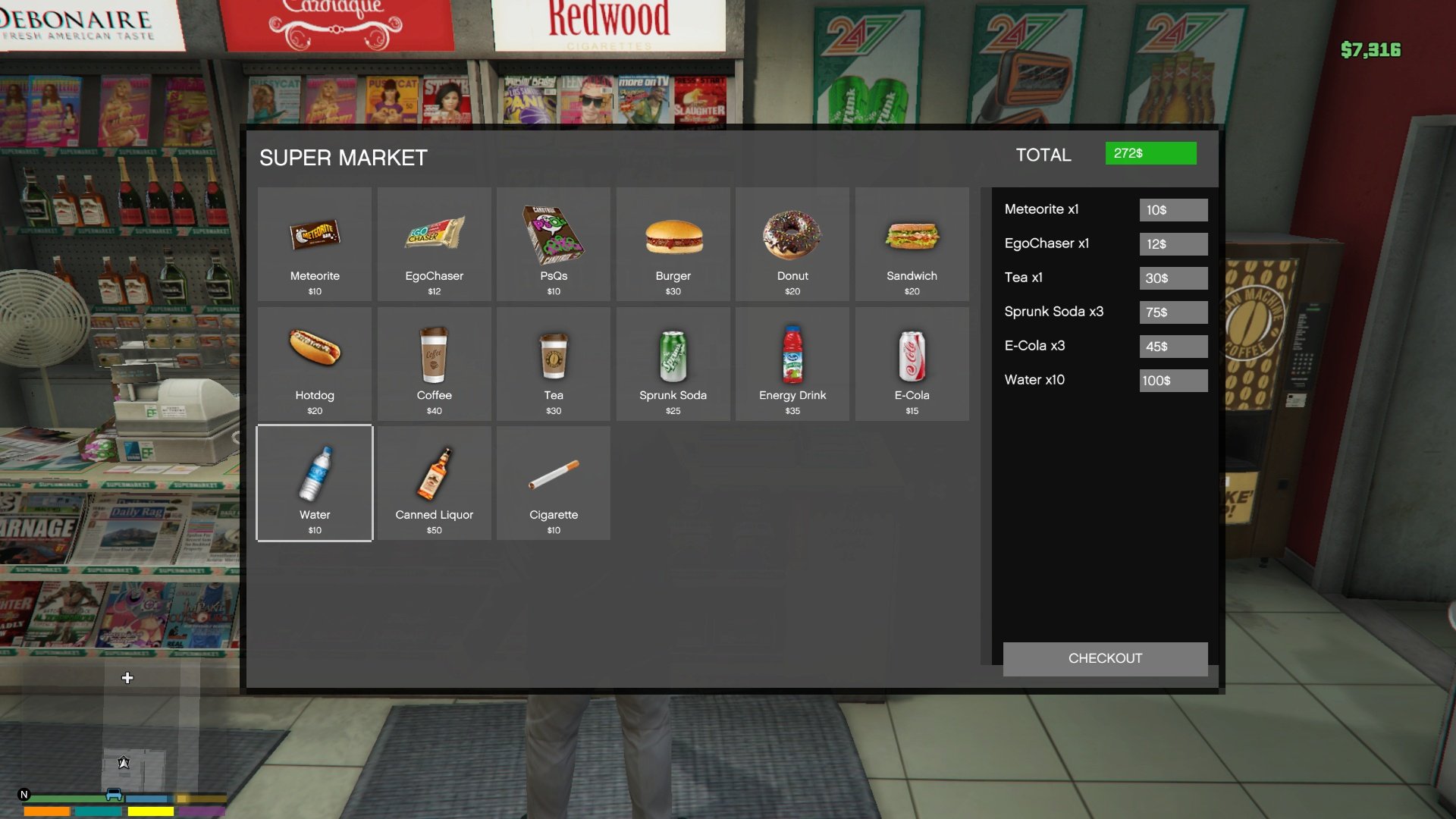
- All new Shops/Pharmacy UI
- All new Inventory UI with Drag and Drop Support
- Helicopter and Plane Hud
- Citizenship/Driving/Boat/Flying/weapon License Test
- Weapon Craft System
- New Custom Phone System (Works Radio, Camera, Calculator, Contact, Settings)
(Default Key: H) - Changeable on VHud/SPPhone/phone.ini
- TrafficControl Sytsem
- Radial Menu (Default Key: K) - Changeable on VHud/radial.ini
- Hunting Job
- Black Market
- MoneyWash (Blackmoney to CleanMoney)
- MileageV system (Vehicle Mileage Monitoring, Engine Oil System, Oil Filter System, Air Filter System, Tire Wear System, Brake System, Suspension System & Mechanic Interaction System)
Note:
Those who install vhud v1.6.1 before, uninstall it. then install this vhud v1.6.2.
● Install addonprops and customanims dlc
● Install Dynasty8 MLO (New location will be add on the next update)
● Replace all YTD files.
● You can use your saved VEH_DB.bin, VEH_META.bin, CHR_DB.bin and CHR_META.bin
● Disable npcinteract on specific ped. edit script/VHud/npcinteract.ini
● If you want create your character again, then while in-game use Character Creator phone contact. OR, you can change before open game, just edit script/VHud/cbjmts/CHCreatorState.ini -> True/False
● Fridge inventory supports food/drink items. To interact fridge go near fridge then you can see Interact Msg. If you want food/drink item to store on fridge, just go near fridge open your Inventory and select your desired food/drink items, then it goes fridge inventory. then close your inventory and then open fridge menu and check.
To take food/drink item from fridge to Inventory, Open fridge menu and just select that item.
Credit all goes to these creators
- For Persistence Uses advanced persistence (by systematic) (already included with vhud v1.6.1)
- Uses PlayerCompanion (by justalemon) — supports money for custom peds. (already included with vhud v1.6.1)
------------------------------------------------------------------------------------------------------------------------------------------------------------------------------
Requirements for v1.6.2:
Installation v1.6.2
1. Put vhud.ytd, phonev.ytd, gymsytem.ytd, realestate.ytd and dealership_v.ytd here "Grand Theft Auto V\mods\update\update.rpf\x64\textures\script_txds.rpf\"
2. Then put all.dll with Vhud folder into the "scripts" folder
3. Install addonprops dlc
4. Install customanims dlc
5. Install Dynasty8 MLO
NOTE: Make Sure to change you preferrable key on vconfig.ini, fishing.ini, gym.ini, peds.ini, because default key is in mess (Sorry about that)
------------------------------------------------------------------------------------------------------------------------------------------------------------------------------
VHud is a comprehensive GTA V mod that introduces an advanced HUD system with customizable UI elements such as health, armor, hunger, thirst, and fuel bars. It allows players to interact with in-game stores and gas stations, providing functionalities like purchasing items and refueling vehicles. This mod also includes features for managing player inventory, seatbelt usage, and dynamic speedometer display.
KeyBindings:
Config Menu Key = F12 (To save settings, Just exit the menu using Back key)
Inventory Key = Tab (Changeable on vconfig.ini)
Seatbelt On/Off Key = B (Changeable on vconfig.ini)
Speedometer Unit Toggle Key = U
Features:
- Adjustable size and position for cash display, health bar, armor bar, hunger bar, thirst bar, fuel bar, and seatbelt indicator.
- Visibility toggles for various HUD components including health bar, armor bar, hunger bar, thirst bar, fuel bar, seatbelt bar, and speedometer.
- Health and armor tracking with visual indicators.
- Hunger and Thirst levels with gradual depletion and consumption effects.
- Starvation and exhaustion checks affecting player health.
- Inventory management allowing players to purchase and consume items. (e.g., Default Key is 'I')
- Item effects on food and water levels, including animations for item consumption.
- Fuel level tracking and refueling mechanics at gas stations.
- Speedometer with switchable units (KM/H or MPH). (e.g., Default Key is 'U')
- Seatbelt functionality with visual and audio feedback. (e.g., Default Key is 'B')
- Store locations with background sprites and blips on the map.
- Purchase menu for buying food and drinks with corresponding price tags.
- Custom sound effects for seatbelt activation and deactivation.
- Configurable menus accessible via keybindings (e.g., F12 for main menu, E for shop menu).
- Progress bar animations for item consumption.
- Blips for store and gas station locations.
- Red Ground markers indicating gas pump locations.
- Configuration file for saving user settings and inventory state.
- Automatic saving of configuration changes and inventory updates.
- Texture loading for HUD icons and other visual elements.
Same goes for any bugs, glitches, or issues you're running into with VHUD — the best place to report them and get help is on the Discord too. I'd really appreciate hearing from you there! 🚀
Need help with VHud on GTA 5 Enhanced? Contact me on Discord — I’ll assist you there.
v1.6.2
- All reported bugs fixed
- All New 4 Dealership with new UI
- All new Shops/Pharmacy UI
- All new Inventory UI with Drag and Drop Support
- Helicopter and Plane Hud
- Citizenship/Driving/Boat/Flying/weapon License Test
- Weapon Craft System
- New Custom Phone System (Works Radio, Camera, Calculator, Contact, Settings)
(Default Key: H) - Changeable on VHud/SPPhone/phone.ini
- TrafficControl Sytsem
- Radial Menu (Default Key: K) - Changeable on VHud/radial.ini
- Hunting Job
- Black Market
- MoneyWash (Blackmoney to CleanMoney)
- MileageV system (Vehicle Mileage Monitoring, Engine Oil System, Oil Filter System, Air Filter System, Tire Wear System, Brake System, Suspension System & Mechanic Interaction System)
Note:
Those who install vhud v1.6.1 before, uninstall it. then install this vhud v1.6.2.
● Install addonprops and customanims dlc
● Install Dynasty8 MLO (New location will be add on the next update)
● Replace all YTD files.
● You can use your saved VEH_DB.bin, VEH_META.bin, CHR_DB.bin and CHR_META.bin
● Disable npcinteract on specific ped. edit script/VHud/npcinteract.ini
● If you want create your character again, then while in-game use Character Creator phone contact. OR, you can change before open game, just edit script/VHud/cbjmts/CHCreatorState.ini -> True/False
● Fridge inventory supports food/drink items. To interact fridge go near fridge then you can see Interact Msg. If you want food/drink item to store on fridge, just go near fridge open your Inventory and select your desired food/drink items, then it goes fridge inventory. then close your inventory and then open fridge menu and check.
To take food/drink item from fridge to Inventory, Open fridge menu and just select that item.
Credit all goes to these creators
- For Persistence Uses advanced persistence (by systematic) (already included with vhud v1.6.1)
- Uses PlayerCompanion (by justalemon) — supports money for custom peds. (already included with vhud v1.6.1)
------------------------------------------------------------------------------------------------------------------------------------------------------------------------------
Requirements for v1.6.2:
- Install nightly.113 or lower ScriptHookVDotNet3 Nightly. if you don't have it yet.
- Latest LemonUI. if you don't have it yet.
- Latest NativeUI. if you don't have it yet.
- Latest iFruitAddon2. if you don't have it yet.
- Recommended Dynasty8 MLO
- Recommended addonprop (custom electric prop, electric nozzle prop, food prop added)
- Recommended customanims (custom animation added)
- Recommended HeapAdjuster
- Recommended Packfile Limit Adjuster
- Optional Remove Minimap Health Bar + Armor Bar. if you don't have it yet.
Installation v1.6.2
1. Put vhud.ytd, phonev.ytd, gymsytem.ytd, realestate.ytd and dealership_v.ytd here "Grand Theft Auto V\mods\update\update.rpf\x64\textures\script_txds.rpf\"
2. Then put all.dll with Vhud folder into the "scripts" folder
3. Install addonprops dlc
4. Install customanims dlc
5. Install Dynasty8 MLO
NOTE: Make Sure to change you preferrable key on vconfig.ini, fishing.ini, gym.ini, peds.ini, because default key is in mess (Sorry about that)
------------------------------------------------------------------------------------------------------------------------------------------------------------------------------
VHud is a comprehensive GTA V mod that introduces an advanced HUD system with customizable UI elements such as health, armor, hunger, thirst, and fuel bars. It allows players to interact with in-game stores and gas stations, providing functionalities like purchasing items and refueling vehicles. This mod also includes features for managing player inventory, seatbelt usage, and dynamic speedometer display.
KeyBindings:
Config Menu Key = F12 (To save settings, Just exit the menu using Back key)
Inventory Key = Tab (Changeable on vconfig.ini)
Seatbelt On/Off Key = B (Changeable on vconfig.ini)
Speedometer Unit Toggle Key = U
Features:
- Adjustable size and position for cash display, health bar, armor bar, hunger bar, thirst bar, fuel bar, and seatbelt indicator.
- Visibility toggles for various HUD components including health bar, armor bar, hunger bar, thirst bar, fuel bar, seatbelt bar, and speedometer.
- Health and armor tracking with visual indicators.
- Hunger and Thirst levels with gradual depletion and consumption effects.
- Starvation and exhaustion checks affecting player health.
- Inventory management allowing players to purchase and consume items. (e.g., Default Key is 'I')
- Item effects on food and water levels, including animations for item consumption.
- Fuel level tracking and refueling mechanics at gas stations.
- Speedometer with switchable units (KM/H or MPH). (e.g., Default Key is 'U')
- Seatbelt functionality with visual and audio feedback. (e.g., Default Key is 'B')
- Store locations with background sprites and blips on the map.
- Purchase menu for buying food and drinks with corresponding price tags.
- Custom sound effects for seatbelt activation and deactivation.
- Configurable menus accessible via keybindings (e.g., F12 for main menu, E for shop menu).
- Progress bar animations for item consumption.
- Blips for store and gas station locations.
- Red Ground markers indicating gas pump locations.
- Configuration file for saving user settings and inventory state.
- Automatic saving of configuration changes and inventory updates.
- Texture loading for HUD icons and other visual elements.
Poprvé nahráno: 01. Březen 2025
Poslední aktulizace: 16. Květen 2026
Last Downloaded: před 9 minutami
509 Komentářů
More mods by MNHC:
If you have any suggestions, feedback, or ideas for improving the mod, please come join my Discord server and let me know!
Same goes for any bugs, glitches, or issues you're running into with VHUD — the best place to report them and get help is on the Discord too. I'd really appreciate hearing from you there! 🚀
Need help with VHud on GTA 5 Enhanced? Contact me on Discord — I’ll assist you there.
v1.6.2
- All reported bugs fixed
- All New 4 Dealership with new UI
- All new Shops/Pharmacy UI
- All new Inventory UI with Drag and Drop Support
- Helicopter and Plane Hud
- Citizenship/Driving/Boat/Flying/weapon License Test
- Weapon Craft System
- New Custom Phone System (Works Radio, Camera, Calculator, Contact, Settings)
(Default Key: H) - Changeable on VHud/SPPhone/phone.ini
- TrafficControl Sytsem
- Radial Menu (Default Key: K) - Changeable on VHud/radial.ini
- Hunting Job
- Black Market
- MoneyWash (Blackmoney to CleanMoney)
- MileageV system (Vehicle Mileage Monitoring, Engine Oil System, Oil Filter System, Air Filter System, Tire Wear System, Brake System, Suspension System & Mechanic Interaction System)
Note:
Those who install vhud v1.6.1 before, uninstall it. then install this vhud v1.6.2.
● Install addonprops and customanims dlc
● Install Dynasty8 MLO (New location will be add on the next update)
● Replace all YTD files.
● You can use your saved VEH_DB.bin, VEH_META.bin, CHR_DB.bin and CHR_META.bin
● Disable npcinteract on specific ped. edit script/VHud/npcinteract.ini
● If you want create your character again, then while in-game use Character Creator phone contact. OR, you can change before open game, just edit script/VHud/cbjmts/CHCreatorState.ini -> True/False
● Fridge inventory supports food/drink items. To interact fridge go near fridge then you can see Interact Msg. If you want food/drink item to store on fridge, just go near fridge open your Inventory and select your desired food/drink items, then it goes fridge inventory. then close your inventory and then open fridge menu and check.
To take food/drink item from fridge to Inventory, Open fridge menu and just select that item.
Credit all goes to these creators
- For Persistence Uses advanced persistence (by systematic) (already included with vhud v1.6.1)
- Uses PlayerCompanion (by justalemon) — supports money for custom peds. (already included with vhud v1.6.1)
------------------------------------------------------------------------------------------------------------------------------------------------------------------------------
Requirements for v1.6.2:
Installation v1.6.2
1. Put vhud.ytd, phonev.ytd, gymsytem.ytd, realestate.ytd and dealership_v.ytd here "Grand Theft Auto V\mods\update\update.rpf\x64\textures\script_txds.rpf\"
2. Then put all.dll with Vhud folder into the "scripts" folder
3. Install addonprops dlc
4. Install customanims dlc
5. Install Dynasty8 MLO
NOTE: Make Sure to change you preferrable key on vconfig.ini, fishing.ini, gym.ini, peds.ini, because default key is in mess (Sorry about that)
------------------------------------------------------------------------------------------------------------------------------------------------------------------------------
VHud is a comprehensive GTA V mod that introduces an advanced HUD system with customizable UI elements such as health, armor, hunger, thirst, and fuel bars. It allows players to interact with in-game stores and gas stations, providing functionalities like purchasing items and refueling vehicles. This mod also includes features for managing player inventory, seatbelt usage, and dynamic speedometer display.
KeyBindings:
Config Menu Key = F12 (To save settings, Just exit the menu using Back key)
Inventory Key = Tab (Changeable on vconfig.ini)
Seatbelt On/Off Key = B (Changeable on vconfig.ini)
Speedometer Unit Toggle Key = U
Features:
- Adjustable size and position for cash display, health bar, armor bar, hunger bar, thirst bar, fuel bar, and seatbelt indicator.
- Visibility toggles for various HUD components including health bar, armor bar, hunger bar, thirst bar, fuel bar, seatbelt bar, and speedometer.
- Health and armor tracking with visual indicators.
- Hunger and Thirst levels with gradual depletion and consumption effects.
- Starvation and exhaustion checks affecting player health.
- Inventory management allowing players to purchase and consume items. (e.g., Default Key is 'I')
- Item effects on food and water levels, including animations for item consumption.
- Fuel level tracking and refueling mechanics at gas stations.
- Speedometer with switchable units (KM/H or MPH). (e.g., Default Key is 'U')
- Seatbelt functionality with visual and audio feedback. (e.g., Default Key is 'B')
- Store locations with background sprites and blips on the map.
- Purchase menu for buying food and drinks with corresponding price tags.
- Custom sound effects for seatbelt activation and deactivation.
- Configurable menus accessible via keybindings (e.g., F12 for main menu, E for shop menu).
- Progress bar animations for item consumption.
- Blips for store and gas station locations.
- Red Ground markers indicating gas pump locations.
- Configuration file for saving user settings and inventory state.
- Automatic saving of configuration changes and inventory updates.
- Texture loading for HUD icons and other visual elements.
Same goes for any bugs, glitches, or issues you're running into with VHUD — the best place to report them and get help is on the Discord too. I'd really appreciate hearing from you there! 🚀
Need help with VHud on GTA 5 Enhanced? Contact me on Discord — I’ll assist you there.
v1.6.2
- All reported bugs fixed
- All New 4 Dealership with new UI
- All new Shops/Pharmacy UI
- All new Inventory UI with Drag and Drop Support
- Helicopter and Plane Hud
- Citizenship/Driving/Boat/Flying/weapon License Test
- Weapon Craft System
- New Custom Phone System (Works Radio, Camera, Calculator, Contact, Settings)
(Default Key: H) - Changeable on VHud/SPPhone/phone.ini
- TrafficControl Sytsem
- Radial Menu (Default Key: K) - Changeable on VHud/radial.ini
- Hunting Job
- Black Market
- MoneyWash (Blackmoney to CleanMoney)
- MileageV system (Vehicle Mileage Monitoring, Engine Oil System, Oil Filter System, Air Filter System, Tire Wear System, Brake System, Suspension System & Mechanic Interaction System)
Note:
Those who install vhud v1.6.1 before, uninstall it. then install this vhud v1.6.2.
● Install addonprops and customanims dlc
● Install Dynasty8 MLO (New location will be add on the next update)
● Replace all YTD files.
● You can use your saved VEH_DB.bin, VEH_META.bin, CHR_DB.bin and CHR_META.bin
● Disable npcinteract on specific ped. edit script/VHud/npcinteract.ini
● If you want create your character again, then while in-game use Character Creator phone contact. OR, you can change before open game, just edit script/VHud/cbjmts/CHCreatorState.ini -> True/False
● Fridge inventory supports food/drink items. To interact fridge go near fridge then you can see Interact Msg. If you want food/drink item to store on fridge, just go near fridge open your Inventory and select your desired food/drink items, then it goes fridge inventory. then close your inventory and then open fridge menu and check.
To take food/drink item from fridge to Inventory, Open fridge menu and just select that item.
Credit all goes to these creators
- For Persistence Uses advanced persistence (by systematic) (already included with vhud v1.6.1)
- Uses PlayerCompanion (by justalemon) — supports money for custom peds. (already included with vhud v1.6.1)
------------------------------------------------------------------------------------------------------------------------------------------------------------------------------
Requirements for v1.6.2:
- Install nightly.113 or lower ScriptHookVDotNet3 Nightly. if you don't have it yet.
- Latest LemonUI. if you don't have it yet.
- Latest NativeUI. if you don't have it yet.
- Latest iFruitAddon2. if you don't have it yet.
- Recommended Dynasty8 MLO
- Recommended addonprop (custom electric prop, electric nozzle prop, food prop added)
- Recommended customanims (custom animation added)
- Recommended HeapAdjuster
- Recommended Packfile Limit Adjuster
- Optional Remove Minimap Health Bar + Armor Bar. if you don't have it yet.
Installation v1.6.2
1. Put vhud.ytd, phonev.ytd, gymsytem.ytd, realestate.ytd and dealership_v.ytd here "Grand Theft Auto V\mods\update\update.rpf\x64\textures\script_txds.rpf\"
2. Then put all.dll with Vhud folder into the "scripts" folder
3. Install addonprops dlc
4. Install customanims dlc
5. Install Dynasty8 MLO
NOTE: Make Sure to change you preferrable key on vconfig.ini, fishing.ini, gym.ini, peds.ini, because default key is in mess (Sorry about that)
------------------------------------------------------------------------------------------------------------------------------------------------------------------------------
VHud is a comprehensive GTA V mod that introduces an advanced HUD system with customizable UI elements such as health, armor, hunger, thirst, and fuel bars. It allows players to interact with in-game stores and gas stations, providing functionalities like purchasing items and refueling vehicles. This mod also includes features for managing player inventory, seatbelt usage, and dynamic speedometer display.
KeyBindings:
Config Menu Key = F12 (To save settings, Just exit the menu using Back key)
Inventory Key = Tab (Changeable on vconfig.ini)
Seatbelt On/Off Key = B (Changeable on vconfig.ini)
Speedometer Unit Toggle Key = U
Features:
- Adjustable size and position for cash display, health bar, armor bar, hunger bar, thirst bar, fuel bar, and seatbelt indicator.
- Visibility toggles for various HUD components including health bar, armor bar, hunger bar, thirst bar, fuel bar, seatbelt bar, and speedometer.
- Health and armor tracking with visual indicators.
- Hunger and Thirst levels with gradual depletion and consumption effects.
- Starvation and exhaustion checks affecting player health.
- Inventory management allowing players to purchase and consume items. (e.g., Default Key is 'I')
- Item effects on food and water levels, including animations for item consumption.
- Fuel level tracking and refueling mechanics at gas stations.
- Speedometer with switchable units (KM/H or MPH). (e.g., Default Key is 'U')
- Seatbelt functionality with visual and audio feedback. (e.g., Default Key is 'B')
- Store locations with background sprites and blips on the map.
- Purchase menu for buying food and drinks with corresponding price tags.
- Custom sound effects for seatbelt activation and deactivation.
- Configurable menus accessible via keybindings (e.g., F12 for main menu, E for shop menu).
- Progress bar animations for item consumption.
- Blips for store and gas station locations.
- Red Ground markers indicating gas pump locations.
- Configuration file for saving user settings and inventory state.
- Automatic saving of configuration changes and inventory updates.
- Texture loading for HUD icons and other visual elements.
Poprvé nahráno: 01. Březen 2025
Poslední aktulizace: 16. Květen 2026
Last Downloaded: před 9 minutami
 5mods on Discord

If you experience any issues with this mod, feel free to join my Discord server (https://discord.gg/6eeUjzzz7Q). Share your feedback in the #general channel—your input is valuable and helps make the mod better.
i cant seem to be able to use the inventory/shop/medical or any visual ingame ui
everything else works fine!
Hi @MNHC is this mod has some sort of vehicle save feature? I think I accidentally saved the vehicle and I don't know how to unsave it, when I get close to the saved vehicle the pop up display 1. start/turnoff a car with remote, 2 move the car with arrow keys, 3 lock the vehicle. Is it vhud that does that?
@privatexunderdog Yes
Oh wow finally! Could you please tell me how do I save & remove saved vehicle?
@privatexunderdog, Go to 'scripts/VHud/' and open AdvPer_LOGS.txt. set
EnableVehicleStreamer set to false
MaxNumberOfStreamedInCars set to 0
EnableBlips to false
hey, @MNHC so everytime i load up the game it says that 1 script couldnt load because scripthookvdotnet2 is depracted, any fix or tips on how to fix this? because this results in the hud not being visible and some contents unavailable. Thanks!
@SushiSenn, its just shdn2 warning, not a error and it doesn't related to vhud visibility. Check pin comment, Join the Discord server, I'll help you there.
@MNHC alright man, really appreciate you helping out
do you have any updates coming out for the mod?
your discord link dont work
Hi @MNHC, Vhud work on GTA 5 Enhanced, but for the YTD folder no. I'm trying to see how to add the replacement YTD inside GTA 5 Enhanced. Do you know a TOOLS ? for GTA 5 Enhanced.
@Wyst_24, Join my discord server, I will give you the tool and tutorial video
Can I hide the road traffic speed notification? Because it makes my game stutter when I move onto different roads, and it's annoying.
Nice mod, too bad the scaling isn't great on 32:9 ratio
Another thing I noticed is as soon as I get on a vehicle, my screen becomes so bright I can see basically nothing anymore and my vehicle is instantly out of fuel. I might be doing something wrong tho.
Another thing I noticed is that after I failed the exam (cuz due to scaling half the questions didn't fit the screen), my game crashed and every start of the game, once it loads the character, it crashes again
can you update the phone to iphonn 17
hey there, i've got an issue with the phone, nothing happens when pressing the phone key besides my char pullinh up the phone. the phone get stuck on the hand and the propper ingame phone wont work anymore and some other actions are also not possible anymore. i always read that you can create a char with it!? i wanna do that but the phone always bugs out. would appreciate some help there. other then that, awesome mod <3
@KazuyaYuza you need to change the decimal system on your OS if your seperator is komma not dot. i've got the same issue, after changing it to american system it worked fine for me. or at least the car and character mechanics xD the SPPhone just wont work for me, always bugging out.
sadly the dynasty8 thing also doesnt work properly. as soon as i press E a curser shows but nothing else. also i cant get rid of it either. bugged out again...